Claude Connectors: A Technical Guide for Teams Building on Top of Them
Most content ranking for Claude Connectors right now is a listicle: “10 best connectors,” “21 favorite connectors,” a GitHub directory cataloguing hundreds of them. That’s useful if you’re a Claude user who wants to browse connectors and see what’s available, and not useful at all if you’re an engineer trying to understand how connectors actually work, whether you should build a custom one for your own product, or why your team keeps hitting authorization errors when connecting a new service.
The Model Context Protocol specification documents the exact handshake connectors rely on. If you are still deciding between models for this kind of integration work, see our Claude Opus vs Sonnet cost and routing guide.
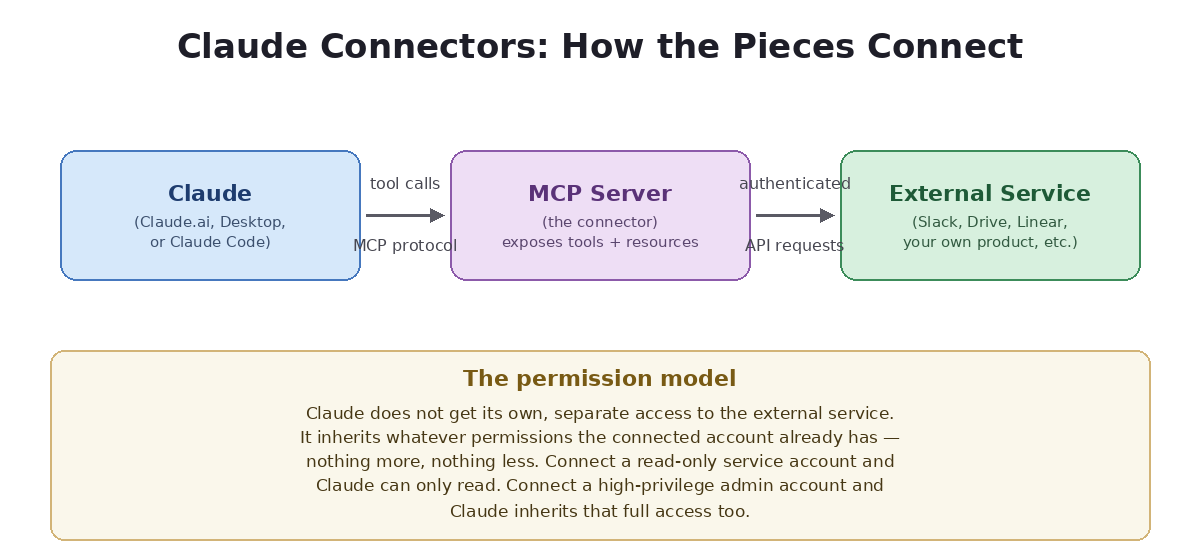
Table of Contents
This post covers that side of Claude Connectors: the protocol underneath them, the security and permissions model you need to understand before rolling connectors out to a team, how to build and host your own, and the failure modes that show up in production once real users start relying on them.
If you’ve only ever used a handful of pre-built Claude Connectors from the directory as an end user, most of what follows will be new — and if you’re already building or approving connectors for a team, it should sharpen a few decisions you may have been making by default rather than deliberately.
What Claude Connectors Actually Are, Technically
A Claude connector is a bridge between Claude and an external service, built on the Model Context Protocol (MCP) — an open specification for how an AI application exposes tools, resources, and data to a model in a structured, discoverable way. When you “connect” a service to Claude, you’re pointing Claude at an MCP server that exposes a defined set of tools (specific actions Claude can invoke) and, often, resources (data Claude can read).
This matters more than it sounds like it should, because it explains both the power and the limits of connectors. Claude doesn’t get generic access to a connected service — it gets exactly the tools that connector’s MCP server chooses to expose, with whatever inputs and outputs that server’s author defined. A well-designed connector exposes narrow, purpose-built tools (“create a Linear issue with this title and description”) rather than a raw API pass-through, and that design choice is what determines whether the connector is safe and reliable to use or a liability once real data is flowing through it.
The permission model
Claude inherits whatever access the connected account already has in the underlying service. Connecting Claude to a Slack workspace doesn’t grant Claude some separate permission set — it operates within the permissions of whichever account authorized the connection. This is the detail most “best connectors” listicles skip entirely, and it’s the one that actually matters when you’re deciding whether to roll a connector out company-wide versus restricting it to a single account with narrower access.
Claude Connectors vs. Building a Custom Integration From Scratch
If your product needs Claude to interact with an internal system that doesn’t have an existing connector, you have two real options: build a custom MCP connector that exposes the specific tools you need, or build a narrower point-to-point integration using the Claude API directly with tool-use definitions you control entirely in your own backend.
| Approach | When it’s the right call |
|---|---|
| Build a custom MCP server / connector | You want the integration reusable across Claude Desktop, Claude Code, and multiple internal products, or you want it discoverable and connectable by other teams |
| Direct API tool-use definitions | The integration is specific to one product, you want full control over the tool schema without MCP’s additional layer, or you’re iterating quickly on tool design |
Teams often default to whichever pattern they saw first, without weighing this tradeoff. If more than one internal team is going to want the same capability — pulling from the same internal ticketing system, say — building it once as an MCP server and exposing it as a connector avoids three teams independently reinventing the same integration with three slightly different tool schemas.
Building a Custom Claude Connector: What the Directory Listicles Skip
If you decide to build your own, the actual engineering work breaks down into a few concrete pieces that the “best connectors” roundups never cover because they’re written for end users, not builders:
- Define narrow, well-scoped tools. Resist the temptation to expose one generic “call any endpoint” tool. Specific tools with clear names and constrained inputs (
create_ticket(title, description, priority)rather thancall_api(method, path, body)) give Claude a much better chance of using them correctly and give you a much smaller surface area to secure. - Handle authentication explicitly. Most connector auth failures in production trace back to token refresh logic that wasn’t built to handle expiry gracefully, or OAuth scopes that were requested too narrowly during setup and have to be re-authorized later. Build token refresh and clear re-auth prompts in from the start rather than patching them in after the first support ticket.
- Return structured, bounded responses. A tool that returns an entire unpaginated database table back to the model both wastes context window and increases the odds of Claude working from stale or truncated data. Paginate, filter, and summarize server-side before the data ever reaches the model. Structure your error messages the same way — a machine-readable code plus a short human-readable string, not a raw stack trace.
- Log every tool call server-side. When something goes wrong in production — a connector takes an action a user didn’t expect — your own server-side log of tool calls and their arguments is the only reliable way to reconstruct what happened, since you can’t always trust the model’s own account of its reasoning after the fact.
A Worked Example: Building a Connector for Your Own SaaS Product
Say you run a project-management SaaS product and want your customers to be able to connect it to Claude, letting them ask questions about their own project data or create tasks conversationally. Walking through the actual build makes the abstract advice above concrete.
Step one: decide the tool boundary. Instead of one tool that exposes your entire REST API, define a handful of specific, purpose-built tools: list_open_tasks(project_id, assignee), create_task(project_id, title, description, due_date), summarize_project_status(project_id). Each tool maps to a single, well-understood action rather than a generic passthrough.
Step two: scope authentication per customer, not per workspace. Each customer connecting your connector should authenticate as themselves, inheriting exactly their own existing permissions inside your product — not a shared admin credential. This is the same principle covered above, applied to a multi-tenant product instead of an internal team tool: get it wrong here and one customer’s connector session could plausibly touch another customer’s data if your authorization checks aren’t enforced at the tool-call layer, not just at the UI layer.
Step three: rate-limit and monitor at the connector layer. Because tool calls now originate from an AI agent’s decisions rather than a human clicking through your UI one action at a time, request patterns look different — a single user session might trigger many more read calls in quick succession than a human would generate manually. Build rate limiting and anomaly monitoring with that pattern in mind rather than reusing thresholds tuned for human traffic.
Step four: design for partial failure. If create_task succeeds but a follow-up request failed while attaching it to a sprint, Claude needs a clear, structured error back so it can explain the partial success to the user rather than silently claiming full success. This is a small design detail that gets skipped constantly and causes a disproportionate share of the “Claude said it did something it didn’t actually do” complaints teams see after shipping a connector.
Security Considerations Before Rolling Out Claude Connectors to a Team
This is the section most listicle content skips entirely, and it’s the one that actually matters if you’re deciding whether to approve connector access for your organization rather than just for yourself:
Scope accounts before you scope connectors
Because Claude inherits the permissions of the connected account, the real access-control decision happens before you ever open Claude’s connector settings — it happens when you decide which account (a shared service account with narrow scopes, versus an individual’s full-access account) gets connected. A shared service account with read-only access to a specific channel or folder is almost always a safer default for team rollouts than connecting a highly-privileged individual account.
Treat connector actions as you would any automated write access
A connector that can send messages, create records, or modify files is functionally similar to any other automation with write access to that system — it deserves the same review you’d give a webhook or a service integration, including a clear owner, a defined scope, and a way to audit what it’s done.
Watch for prompt injection through connected data
Once a connector can read data from an external source — a document, an email thread, a ticket description — that data can contain text that looks like instructions to the model. A well-built connector and a careful Claude configuration treat retrieved content as data, not as commands, but this is a genuinely active risk area worth explicit attention rather than an assumption that it’s handled automatically.
A Rollout Checklist for IT and Security Teams
If you’re the person responsible for approving which Claude Connectors get turned on across an organization rather than just using one yourself, a short structured review before approval saves a lot of incident-response time later, turning the checklist below into concrete action items before anything goes live:
- Identify what account will actually be connected. Confirm whether it’s a shared service account or an individual’s account, and what that account can already do in the underlying system — that access, not anything configured in Claude, is the real permission boundary.
- Confirm the connector’s tool list, not just its name. “Connects to Google Drive” could mean read-only search or full read/write access depending on the specific connector and the scopes requested during authorization — check the actual permission prompt shown at connect time rather than assuming based on the service name.
- Decide on a review cadence, not just an initial approval. Connector scopes and available tools change as services update their integrations. A connector approved a year ago may now expose capabilities that didn’t exist at approval time.
- Set an audit expectation up front. Know where tool-call logs live (either Claude’s own activity records or your own server-side logs for a custom connector) before you need them during an incident, not after.
- Document who owns each approved connector. When a connector starts behaving unexpectedly, there should be an unambiguous answer to “who do we ask about this” rather than a scramble to figure out who set it up originally. Cross-reference each connector’s tool list against your existing integration inventory so you’re not approving two connectors that quietly do the same thing.
Troubleshooting Common Claude Connectors Errors
Claude Authorization Failed or Internal Server Error on Connect
This most commonly traces back to an expired or revoked token on the service side rather than an issue with Claude itself. Disconnecting and fully re-authorizing the connector (rather than just retrying) resolves the majority of these cases; if it persists, check whether the connected service’s admin console shows the integration as still authorized on its end.
Connector shows connected but tools aren’t available
This usually indicates the connected account’s permission scope doesn’t include whatever the tool needs — for example, a read-only scope connected where a tool requires write access. Re-authorizing with the correct scope, rather than assuming the connector is broken, fixes this in most cases.
Intermittent timeouts on tool calls
If you’ve built a custom connector and see intermittent timeouts, check the response size and latency of your own MCP server first — a tool that queries a slow downstream system or returns a very large payload is a far more common cause than an issue on Claude’s side.
Claude Connectors and MCP: Where This Is Heading
The broader Model Context Protocol ecosystem has grown fast enough that connectors are increasingly treated as infrastructure rather than a novelty feature — the directory of available integrations spans communication, project management, engineering, and finance tools, and that breadth is exactly why the security and design questions above matter more now than they did when connectors first launched. See Anthropic’s official connectors help center article, which is worth checking for the current list of supported services before you decide whether a custom build is even necessary.
If you’re architecting for this shift, our engineering guide to the AI agent ecosystem covers designing safe boundaries for production agent tool use and multi-tenant isolation patterns in more depth, since the access-control problem connectors introduce is close to identical to what broader agent frameworks face.
Frequently Asked Questions
Do Claude Connectors work the same way across Claude.ai, Claude Desktop, and Claude Code?
Web-based connectors are broadly available across the consumer surfaces, while certain connector types (particularly desktop extensions) are specific to Claude Desktop. Claude Cowork inherits the same connector model as Claude.ai, so anything approved for the web surface is generally available there too. If you’re building for a team that uses multiple surfaces, verify a given connector’s availability on each one rather than assuming parity.
Can I restrict which connectors my team is allowed to use?
This depends on your plan and admin configuration — organizations on managed plans typically have more control over which connectors are approved for use, which is worth setting up before broad rollout rather than after an unapproved connector is already in use.
Is building a custom MCP server difficult?
Not especially, for a narrowly scoped tool — the specification is straightforward and there are existing SDKs that handle most of the protocol plumbing. The actual engineering effort is almost always in the authentication, scoping, and response-shaping decisions covered above, not in the protocol implementation itself. Teams that add custom connectors for a handful of internal systems usually find the second build much faster than the first.
What’s the biggest mistake teams make when adopting Claude Connectors?
Connecting a high-privilege individual account to save setup time, instead of provisioning a scoped service account up front. It works fine until the connector does something unexpected, at which point the blast radius is the full access of whichever account was connected.
Should every internal tool get its own Claude connector?
No — build one when the capability needs to be reusable across multiple products or teams, or when you specifically want it discoverable through Claude’s connector directory. For a single internal workflow used by one team, a direct API integration with tool-use definitions is often simpler to build and maintain than standing up a full MCP server.
The Bottom Line
Claude Connectors are genuinely useful infrastructure, but the “best connectors to try” framing that dominates search results today skips the decisions that actually matter for a team: which account you connect, how narrowly you scope a custom connector’s tools, and how you log and audit what it does once it’s live. Get those right and connectors are a safe, high-leverage way to extend what Claude can do inside your product or your team’s workflow.
