Short answer: For BullMQ rate limiting, if you know the quota of the API your jobs call, set the limiter option on the BullMQ Worker with a max and a duration. If the API tells you when to back off, for example with a 429 response, call worker.rateLimit() and throw Worker.RateLimitError() so the job goes back to waiting instead of failing. The limiter is global across every worker on the queue, while concurrency is a separate setting that applies per worker.
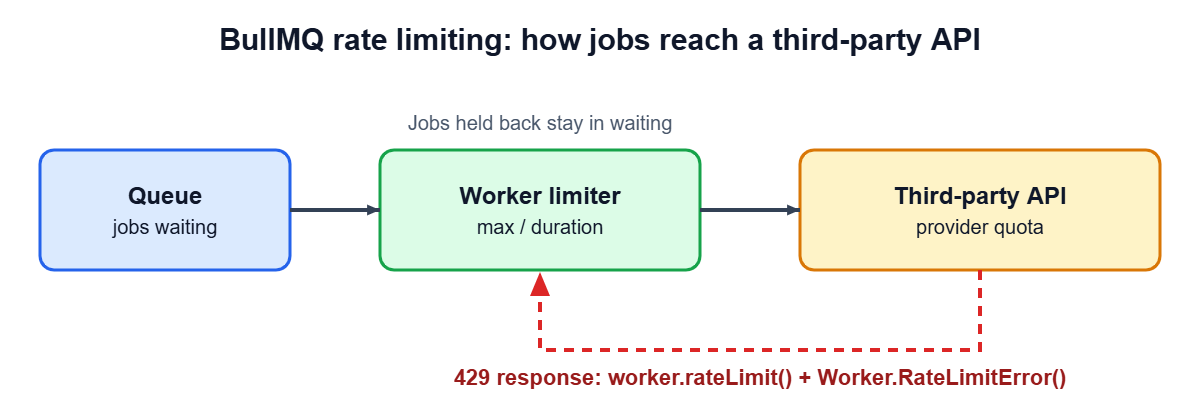
Table of Contents
Background jobs are often the biggest source of traffic to the third-party APIs your product depends on. A queue makes it easy to enqueue ten thousand sync jobs, and a pool of workers will happily fire them at a CRM or payment provider as fast as it can. The provider answers with 429 errors, the jobs fail, and your retry settings start making the problem worse. BullMQ has two built-in tools for this, and they solve different problems.
BullMQ rate limiting: two problems, two tools
- A known, fixed quota. The provider allows, say, ten requests per second. Use the Worker
limiteroption and never exceed it. - A dynamic limit. The provider throttles you based on load or your plan and tells you when to retry. Use
worker.rateLimit()to pause the queue for the time it asks for.
Most production BullMQ rate limiting setups use both: a limiter set slightly under the documented quota, plus manual handling for the 429 responses that still arrive.
Set a fixed quota with the limiter option
The limiter takes max, the number of jobs, and duration, the window in milliseconds. This worker processes at most ten jobs per second:
import { Worker } from 'bullmq';

const worker = new Worker(
  'sync-crm',
  async (job) => {
    return pushContactToCrm(job.data);
  },
  {
    connection,
    limiter: {
      max: 10,
      duration: 1000,
    },
  },
);
Three behaviors from the BullMQ documentation on rate limiting are worth knowing:
- Jobs that get rate limited stay in the waiting state. They are not failed and they do not use up retry attempts.
- The limiter is global. If you run ten workers with these settings, the queue still processes only ten jobs per second in total, so adding workers does not raise your throughput past the limit.
- From BullMQ 2.0 onward you do not need a
QueueScheduler. Older tutorials that create one are out of date.
React to 429 responses with worker.rateLimit()
A fixed limiter cannot know that the provider is having a bad minute. For that case BullMQ lets the handler pause the whole queue for a duration you choose. The sequence is to call worker.rateLimit(ms) and then throw Worker.RateLimitError(). The error is how BullMQ tells this case apart from a real failure, so the job is moved back to waiting.
import { Worker } from 'bullmq';

const worker = new Worker(
  'sync-crm',
  async (job) => {
    const res = await fetch('https://api.example.com/contacts/' + job.data.id, {
      method: 'PUT',
      headers: { 'content-type': 'application/json' },
      body: JSON.stringify(job.data.payload),
    });

    if (res.status === 429) {
      const retryAfterSeconds = Number(res.headers.get('retry-after') ?? 1);
      await worker.rateLimit(retryAfterSeconds * 1000);
      // Required: tells BullMQ this is a rate limit, not a failure.
      throw Worker.RateLimitError();
    }

    if (!res.ok) {
      throw new Error('CRM responded with ' + res.status);
    }

    return res.json();
  },
  {
    connection,
    concurrency: 5,
    limiter: { max: 10, duration: 1000 },
  },
);
Note that this BullMQ rate limiting example still passes limiter. The documentation warns that you must provide limiter options to the Worker for manual rate limiting to work, because limiter.max determines whether the rate limit check runs at all. Also note that the handler throws a normal error for other non-2xx responses, so those still follow your usual retry and backoff rules. For guidance on choosing those, see Node.js error handling for queue systems.
How concurrency fits into BullMQ rate limiting
Concurrency and the limiter constrain different things. The concurrency option sets how many jobs a single worker processes at the same time, and the BullMQ documentation notes it helps when the handler does asynchronous work such as database or HTTP calls. The limiter caps how many jobs are processed per time window across the whole queue.
new Worker('sync-crm', handler, {
  connection,
  concurrency: 5,                    // up to 5 jobs in flight per worker process
  limiter: { max: 10, duration: 1000 }, // at most 10 jobs per second for the whole queue
});
Raising concurrency makes the queue work through its backlog faster until it hits the limiter, and from then on the limiter is what sets your pace. If a provider also caps simultaneous connections, concurrency is the setting to lower.
Debug a queue that looks stuck
When a rate limit is active, jobs sit in waiting and it can look as if workers have stopped. Two queue methods help you check:
// Time left on the current rate limit, in milliseconds. Greater than 0 means the queue is limited.
const ttl = await queue.getRateLimitTtl(10);

// Clear the rate limit so workers pick up jobs again and the counter resets.
await queue.removeRateLimitKey();
Use removeRateLimitKey() carefully. Clearing a limit that exists because a provider asked you to back off will just send you straight back into 429 responses.
Per-tenant limits
Many SaaS products want to limit work per customer so one tenant cannot use the whole queue. The open-source BullMQ limiter does not do this: its group keys were removed in BullMQ 3.0, and group rate limiting now belongs to BullMQ Pro. With the open-source package you have to build per-tenant fairness yourself, for example with separate queues for different classes of customers, each with its own limiter, or with a small limiter in your own code that runs before the job is enqueued.
Which BullMQ rate limiting tool to use
| Tool | Use it when | Scope |
|---|---|---|
limiter on the Worker | You know the provider quota and want to stay under it | Global across all workers on the queue |
worker.rateLimit() + Worker.RateLimitError() | The provider answers 429 or tells you how long to wait | Pauses the queue for the duration you pass |
concurrency | You want to control how many jobs run at once per worker | Per worker process |
| Separate queues | Different job types or customers need different limits | Per queue |
Common BullMQ rate limiting mistakes
- Treating a 429 as an ordinary failure. Retries with backoff burn attempts and keep hitting the provider. Use
worker.rateLimit()so the job waits instead. - Forgetting to throw
Worker.RateLimitError(). Callingworker.rateLimit()alone is not enough; the throw is what returns the job to waiting. - Omitting the limiter option. Manual rate limiting needs
limiteron the Worker, as the documentation warns. - Setting the limit at the quota. Other services may share the same API key, so leave some headroom.
- Expecting more workers to mean more speed. The limiter is global, so extra workers help only while you are below it.
Frequently Asked Questions
Do jobs held back by BullMQ rate limiting count as failed attempts?
No. Jobs held back by the limiter stay in the waiting state, and a job moved back with Worker.RateLimitError() is treated as a rate limit rather than a failure.
Does adding more workers raise BullMQ rate limiting throughput?
No. The limiter is global across all workers on the queue, so the combined throughput stays at your configured maximum.
Can BullMQ rate limiting work per customer in the open-source version?
Not directly. Group-based limiting was removed from the open-source package in 3.0 and is part of BullMQ Pro, so per-customer limits need separate queues or your own limiter.
To check that your queue and its limits behave as intended, read how to test BullMQ workers. To compare queue options, see Bull vs BullMQ and BullMQ vs RabbitMQ. If you need help getting a queue system under control, see hiring a Node.js developer.
