Claude for Students: The Practical Guide the Official Pages Don’t Give You
Search for Claude for Students today and you’ll mostly find two kinds of pages: Anthropic’s own institutional marketing for universities, and “student discount” roundups that all arrive at the same disappointing conclusion — there isn’t one, at least not for individuals buying Claude Pro on their own. Both of those are true and neither is actually useful if you’re a student sitting in front of claude.ai trying to figure out how to use it well without getting flagged for academic dishonesty or hitting a message limit mid-assignment.
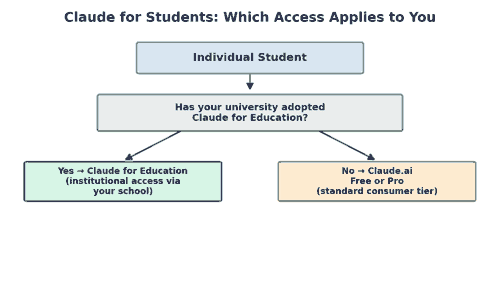
Table of Contents
This guide skips the institutional sales pitch and the discount-hunting and focuses on what individual students actually need. That means how the free tier really behaves under real usage, and when Claude for Education (the university-licensed version) applies to you instead. It also covers how to use Claude for research and writing without crossing into academic integrity violations, and how it stacks up against ChatGPT for the specific tasks students actually do.
Claude for Students vs. Claude for Education: They’re Not the Same Thing
This is the single most common point of confusion in this space, including a lot of what currently ranks. There are two completely different products:
- Claude for Education is an institutional license that a university purchases and rolls out to its students and faculty, often with expanded usage limits, admin controls, and integration into campus systems. If your school has this, you’ll typically get an email from your IT department with a sign-in link tied to your school account — you don’t sign up for it yourself.
- Claude.ai free or Pro is what almost every individual student without institutional access is actually using: the standard consumer product, same as anyone else, with the standard free-tier message limits or a personal Pro subscription.
If your university hasn’t announced a Claude for Education rollout, you’re in the second category, and every “student discount” you find by searching is describing a program that, as of now, does not exist for individual Pro subscribers. Anthropic’s discounting, when it exists at all, has historically come through institutional licensing, not a consumer coupon code — so if a page promises a personal Claude Pro student discount, treat it skeptically.
Getting the Most Out of the Free Tier
Most students start on the free tier, and most of the frustration with existing guides online comes from not understanding how that tier actually behaves under real use:
Message limits reset, but not instantly
Free tier usage is capped over a rolling window rather than a hard daily cutoff. If you burn through your limit doing a long research session the night before a paper is due, the honest fix is planning around the reset window, not searching for a workaround — most of the “increase Claude free limit” advice circulating is either outdated or doesn’t actually work.
Long conversations cost you context, not just messages
A single long back-and-forth conversation uses up context window budget faster than several short, focused ones. For a research or writing workflow, starting a fresh conversation per distinct task (one for outlining, one for a specific chapter, one for citation checking) tends to get more useful output per message than one sprawling thread.
Uploading source documents beats pasting text
If you’re working from a PDF reading, lecture slides, or a dataset, uploading the file directly gives Claude more structure to work with than pasting raw copied text. It’s also more reliable for longer documents that would otherwise eat your context budget just being pasted in as plain text.
What Claude Is Actually Good At for Coursework
Skip the generic “AI can help you study” framing. Here’s where it concretely earns its place in a student’s workflow, by task type:
Not to be confused with Claude Code or Learning Mode
Two other Anthropic products get mentioned in the same breath as general coursework help but solve different problems. Claude Code is a coding-focused agent built for software projects, not essays or reading questions — if the assignment is a programming project rather than written work, that’s the more relevant tool to reach for. Learning Mode is closer to what most of this guide covers: it deliberately walks through a problem with guiding questions instead of handing back a finished answer, which keeps the interaction closer to tutoring than to outsourcing the work.
Writing feedback, not writing replacement
Claude is strongest when you bring it a draft and ask for specific, structural feedback — argument clarity, whether a paragraph actually supports its topic sentence, where a citation is doing too much work for the claim it supports. It’s meaningfully weaker used as a first-draft generator for anything you’re expected to have written yourself, both because the output tends to read as generic and because that use crosses directly into most schools’ academic integrity policies.
Explaining, not just answering
For STEM coursework specifically, the highest-value pattern is asking Claude to walk through the reasoning steps of a problem you’ve already attempted, rather than asking it to solve the problem cold. Framed that way, it functions closer to office hours than to a homework-completion tool, and you actually retain the method for the exam.
Document analysis across long readings
Political science, law, history, and philosophy courses often assign readings measured in hundreds of pages across a semester. Claude’s ability to hold a long document in context and answer specific questions against it — “where does this author address the counterargument from chapter 2” — is a genuinely different capability than search-and-skim, and it’s one of the strongest individual use cases for students specifically.
Code debugging for CS coursework
For programming assignments, Claude is far more useful pointed at a specific failing test case or error message than asked to “write the assignment.” Pasting a stack trace and asking what’s causing it teaches debugging skill. Asking for the whole solution teaches you nothing and is usually an academic integrity violation on top of that.
Setting Up a Semester-Long Workflow With Claude
Most students use Claude reactively — opening it when stuck on something specific — and get inconsistent results because every conversation starts from zero. A small amount of upfront structure changes that:
- Keep one running conversation per course, not per assignment. Within Claude’s context limits, this lets you reference “the paper we discussed last week” without re-explaining the whole assignment, and it builds a rough model of the course’s expectations over the semester.
- Paste in the actual rubric or assignment prompt before asking for feedback. Generic feedback on a draft is far less useful than feedback measured against the specific criteria your professor is grading on — most students skip this step and get generic notes as a result.
- Ask for feedback in rounds, not all at once. Requesting “everything wrong with this draft” produces an overwhelming, hard-to-action list. Asking specifically about argument structure first, then separately about evidence, then separately about clarity, produces feedback you can actually work through.
- Save your best prompts. If a particular way of asking for feedback or explanation worked well for one assignment, it’ll likely work well for the next one in the same course — keep a running note of prompts that produced genuinely useful output.
Claude for Students by Subject Area
The right way to use Claude shifts meaningfully depending on what you’re studying, and generic advice tends to flatten these differences:
STEM and quantitative courses
Use it to check your work step-by-step rather than to generate solutions. Asking “here’s my derivation, where did I go wrong” builds the skill the course is trying to teach; asking “solve this problem set” doesn’t, and it’s also the fastest way to end up with an answer you can’t explain if a professor asks you to walk through it.
Humanities and writing-intensive courses
This is where Claude for Students tends to add the most value with the least risk — structural feedback on your own argument, help identifying where a source is being misread, and testing counterarguments against your thesis before you submit. Keep the actual prose your own.
Business and case-study courses
Claude is useful for stress-testing a business case analysis — asking it to argue the opposite recommendation from the one you’ve reached, which often surfaces weaknesses in your own reasoning before a professor does.
Computer science and programming
Treat it like a very patient teaching assistant for debugging and concept explanation, not an assignment-completion tool. The academic integrity risk is highest here because submitted code is easy to compare against a model’s typical output style, and the learning loss from skipping the debugging process yourself is significant.
Privacy Considerations Worth Knowing
Before uploading course materials, drafts, or personal data to any AI tool, it’s worth understanding a few basics that most guides on this topic skip entirely. Avoid uploading documents that contain other students’ personal information — group project submissions, shared datasets with names attached. Check your university’s specific policy on uploading proprietary course materials like problem sets or exam banks. And be cautious about pasting anything you wouldn’t want stored by a third-party service, even one with a reasonable privacy policy. None of this is unique to Claude, but it’s worth applying the same caution you’d apply to any cloud tool handling your academic work.
If Claude Pro Isn’t Available or Affordable
If your school hasn’t adopted Claude for Education and the free tier’s limits are too restrictive for your workload, a few realistic options exist before assuming you need a paid Pro subscription. Check whether your university library or writing center offers any AI tool access as part of existing academic support services. Use the free tier deliberately for the highest-value tasks — rubric-based feedback, long-document analysis — rather than everyday quick questions. And revisit the question each semester, since institutional AI access is expanding quickly and your school’s policy may change before you graduate.
Cost, not access, is the other common blocker. A separate question worth asking is whether there’s a way to make Claude Pro cheaper than paying full price out of pocket — and the honest answer is that promo codes and a random discount code from a coupon site are not the real path there. Legitimate free Claude access for students almost always comes through a university-wide agreement rather than an individual voucher, typically billed to the school on annual billing rather than charged per seat. Schools that have set up this kind of access for students, faculty and staff include Champlain College, Northeastern University, and the London School of Economics; if yours isn’t on that list yet, it’s worth asking your IT department or library directly rather than assuming the answer is no.
Claude for Students and Academic Integrity: Where the Line Actually Is
Every official Claude for Education page gestures at “follow your university’s policy” without saying much more, which isn’t wrong but isn’t very actionable either. In practice, the line most schools draw comes down to a simple test: did the AI do thinking you were being assessed on, or did it help you do your own thinking better?
- Generally fine: asking for feedback on a draft you wrote, asking Claude to explain a concept you’re stuck on, using it to check your understanding of a reading, debugging your own code.
- Generally a violation: having Claude write a paper or problem set you submit as your own original work, using it during a closed-book assessment, submitting AI-generated code for an assignment meant to demonstrate you can write it yourself.
- Always check your specific syllabus. Individual professors and departments set stricter or more permissive rules than the university-wide policy, and “my school allows AI generally” doesn’t override a specific course’s stated policy.
If you’re ever unsure whether a specific use crosses the line, the safest move is asking the professor directly before the assignment is due, not after you’ve already used the tool a way you’re not sure is allowed.
Claude vs. ChatGPT for Coursework: The Honest Comparison
Most comparison content here is written for general consumers, not specifically for coursework. For student-specific tasks, the practical differences that matter are narrower than the marketing suggests:
| Task | Better fit |
|---|---|
| Long document / reading analysis | Claude — stronger at holding and reasoning over long context |
| Quick fact lookup with citations | Either, though verify citations from both independently |
| Writing feedback on structure and argument | Claude — tends toward more direct, less flattering feedback |
| Brainstorming and idea generation | Either — largely comes down to personal preference |
| Image generation for projects/presentations | ChatGPT — broader native image generation support |
For most students, the realistic answer isn’t “pick one” — it’s using whichever tool your specific task fits better, since both are cheap or free at the tier most students actually use. If you’re only going to maintain one account due to time or budget constraints, base the decision on your heaviest recurring task rather than an average of everything you might occasionally need. A philosophy or law student reading hundreds of pages a week benefits more from Claude’s long-context handling than from marginal differences in image generation quality. A design or marketing student building visual presentations may find the opposite tradeoff more relevant.
Where to Verify Current Details
Because pricing, message limits, and institutional rollout details change fairly often, treat any specific number in this guide (or any other article on this topic, including the ones currently ranking above it) as directional rather than permanent. Anthropic’s own Claude for Education support article is the most reliable source for whether your specific university has adopted the institutional product, and it’s worth checking each semester rather than relying on a cached search result. If you’re also using Claude for a personal coding project alongside coursework, our engineering blog covers the same model in a production context, which is a useful reference once you move from student projects to something you’re shipping for real users.
Frequently Asked Questions
Is there really no Claude Pro student discount?
Not for individual subscribers as of now. The education-specific offering is Claude for Education, an institutional license your school has to adopt — it isn’t something you can sign up for individually at a discounted rate.
How do I know if my university has Claude for Education?
Check with your IT department or look for an announcement from your school’s academic technology office. If your school has adopted it, you’ll typically sign in through a school-specific link rather than the standard claude.ai signup.
Will professors know if I used Claude?
AI-detection tools are unreliable enough that schools are increasingly moving away from relying on them alone. But that’s not a reason to treat undisclosed AI-written submissions as safe. The more common enforcement mechanism is a mismatch between your submitted work’s style and your known writing, or a straightforward admission during a follow-up conversation about your own paper.
Can Claude help with citations and bibliographies?
It can help format citations you provide and check consistency, but always verify the actual citation details against the source — like any AI tool, it can generate a citation that looks correct but references details it didn’t actually verify.
What’s the single best habit for using it effectively?
Bring it a draft or an attempt, not a blank page. The tool adds the most value reacting to your own work-in-progress, and that habit alone keeps you on the right side of most academic integrity policies too.
Does Claude get updated with new features often?
Yes — both the consumer product and the institutional Claude for Education offering have received frequent updates, including expanded file handling, longer context windows, and new connector integrations. Revisit your workflow periodically rather than assuming the tool works exactly the way it did when you first tried it.
The Bottom Line
Claude for Students works best as a feedback partner and a research aid, not a homework-completion service — and understanding that distinction matters more than chasing a student discount that doesn’t currently exist for individual subscribers. If your school offers Claude for Education, use that; if it doesn’t, the free or Pro consumer tier is the same product everyone else uses, and the habits that make it useful are the same ones that keep you clearly inside your university’s academic integrity policy.
Related reading: If you’re evaluating Claude for other contexts, see our guides on Claude Connectors and Claude Opus vs Sonnet for production teams.
