Specsavers: RESTful User Management and Secure Authentication
Specsavers is a leading optical and hearing care website offering eye tests, prescription glasses, contact lenses, and hearing services, with online booking and product browsing supported by professional in-store care. This Specsavers case study covers the backend reliability and authentication work behind that experience.
Table of Contents
What We Built
%3B%20fill%3A%20none%3B%20%7D%0A%20%20%3C%2Fstyle%3E%0A%20%20%3Cdefs%3E%0A%20%20%20%20%3Cmarker%20id%3D%22arrowhead%22%20markerWidth%3D%2210%22%20markerHeight%3D%227%22%20refX%3D%229%22%20refY%3D%223.5%22%20orient%3D%22auto%22%3E%0A%20%20%20%20%20%20%3Cpolygon%20points%3D%220%200%2C%2010%203.5%2C%200%207%22%20fill%3D%22%232456a6%22%2F%3E%0A%20%20%20%20%3C%2Fmarker%3E%0A%20%20%3C%2Fdefs%3E%0A%0A%20%20%3Ctext%20x%3D%22450%22%20y%3D%2230%22%20text-anchor%3D%22middle%22%20font-size%3D%2218%22%20font-weight%3D%22700%22%20fill%3D%22%231a1a1a%22%3ESpecsavers%20Case%20Study%20%26%238212%3B%20Authentication%20%26amp%3B%20Authorization%20Flow%3C%2Ftext%3E%0A%0A%20%20%3Crect%20class%3D%22box%22%20x%3D%2230%22%20y%3D%2270%22%20width%3D%22160%22%20height%3D%2270%22%2F%3E%0A%20%20%3Ctext%20class%3D%22label%22%20x%3D%22110%22%20y%3D%22100%22%3EReact%20Frontend%3C%2Ftext%3E%0A%20%20%3Ctext%20class%3D%22sub%22%20x%3D%22110%22%20y%3D%22120%22%3ERequests%20a%20token%3C%2Ftext%3E%0A%0A%20%20%3Crect%20class%3D%22box%22%20x%3D%22240%22%20y%3D%2270%22%20width%3D%22180%22%20height%3D%2270%22%2F%3E%0A%20%20%3Ctext%20class%3D%22label%22%20x%3D%22330%22%20y%3D%22100%22%3EAzure%20Active%20Directory%3C%2Ftext%3E%0A%20%20%3Ctext%20class%3D%22sub%22%20x%3D%22330%22%20y%3D%22120%22%3EIssues%20signed%20token%3C%2Ftext%3E%0A%0A%20%20%3Crect%20class%3D%22box%22%20x%3D%22460%22%20y%3D%2270%22%20width%3D%22180%22%20height%3D%2270%22%2F%3E%0A%20%20%3Ctext%20class%3D%22label%22%20x%3D%22550%22%20y%3D%22100%22%3EASP.NET%20Core%20API%3C%2Ftext%3E%0A%20%20%3Ctext%20class%3D%22sub%22%20x%3D%22550%22%20y%3D%22120%22%3EValidates%20signature%2C%20claims%3C%2Ftext%3E%0A%0A%20%20%3Crect%20class%3D%22box%22%20x%3D%22680%22%20y%3D%2270%22%20width%3D%22190%22%20height%3D%2270%22%2F%3E%0A%20%20%3Ctext%20class%3D%22label%22%20x%3D%22775%22%20y%3D%22100%22%3EUser%20Management%3C%2Ftext%3E%0A%20%20%3Ctext%20class%3D%22sub%22%20x%3D%22775%22%20y%3D%22120%22%3ERESTful%20resources%3C%2Ftext%3E%0A%0A%20%20%3Cline%20class%3D%22arrow%22%20x1%3D%22190%22%20y1%3D%22105%22%20x2%3D%22235%22%20y2%3D%22105%22%2F%3E%0A%20%20%3Cline%20class%3D%22arrow%22%20x1%3D%22420%22%20y1%3D%22105%22%20x2%3D%22455%22%20y2%3D%22105%22%2F%3E%0A%20%20%3Cline%20class%3D%22arrow%22%20x1%3D%22640%22%20y1%3D%22105%22%20x2%3D%22675%22%20y2%3D%22105%22%2F%3E%0A%0A%20%20%3Crect%20class%3D%22box%22%20x%3D%22330%22%20y%3D%22220%22%20width%3D%22180%22%20height%3D%2270%22%2F%3E%0A%20%20%3Ctext%20class%3D%22label%22%20x%3D%22420%22%20y%3D%22250%22%3EClaims-Based%20Authz%3C%2Ftext%3E%0A%20%20%3Ctext%20class%3D%22sub%22%20x%3D%22420%22%20y%3D%22270%22%3EServer-side%20only%3C%2Ftext%3E%0A%0A%20%20%3Crect%20class%3D%22box%22%20x%3D%22550%22%20y%3D%22220%22%20width%3D%22180%22%20height%3D%2270%22%2F%3E%0A%20%20%3Ctext%20class%3D%22label%22%20x%3D%22640%22%20y%3D%22250%22%3ERedacted%20Logging%3C%2Ftext%3E%0A%20%20%3Ctext%20class%3D%22sub%22%20x%3D%22640%22%20y%3D%22270%22%3ENo%20sensitive%20fields%3C%2Ftext%3E%0A%0A%20%20%3Cline%20class%3D%22arrow%22%20x1%3D%22550%22%20y1%3D%22140%22%20x2%3D%22420%22%20y2%3D%22215%22%2F%3E%0A%20%20%3Cline%20class%3D%22arrow%22%20x1%3D%22510%22%20y1%3D%22255%22%20x2%3D%22545%22%20y2%3D%22255%22%2F%3E%0A%0A%20%20%3Ctext%20x%3D%22450%22%20y%3D%22335%22%20text-anchor%3D%22middle%22%20font-size%3D%2211%22%20fill%3D%22%236a6a6a%22%3ESpecsavers%20case%20study%20%26%238212%3B%20Senior%20Fullstack%20Developer%2C%20Techscale%20(Specsavers%20engagement)%2C%202023%3C%2Ftext%3E%0A%3C%2Fsvg%3E%0A)
Consumer health-and-retail platforms like this tend to accumulate user-facing features quickly, booking flows, prescription history, loyalty programs, while the user management and authentication layer underneath grows more slowly and less visibly. That asymmetry is exactly where reliability problems tend to hide: the foundational layer keeps working “well enough” for a long time even as more and more features come to depend on it. Eventually, a subtle inconsistency in how it handles an edge case surfaces as a confusing bug several layers up, in a completely unrelated feature.
In 2023, as a Senior Fullstack Developer at Techscale, Faisal worked on two related pieces of Specsavers’ platform: the backend services that manage user accounts, and the authentication layer that protects them. The work covered developing and maintaining RESTful User Management APIs built with ASP.NET, with an explicit focus on improving reliability and security, and implementing secure authentication using Azure Active Directory, integrating a React frontend with an ASP.NET Core backend.
These two efforts sit close together in a typical platform: the API layer defines how user data is read, created, and updated. The authentication layer, meanwhile, determines who is allowed to call those APIs and what they are allowed to do once they are in. Getting both right matters for a consumer-facing site handling bookings and personal health-adjacent data, where a broken or loosely secured user endpoint is not just an inconvenience but a real risk.
The Challenge
User management is deceptively easy to get wrong. It sits underneath almost every other feature — booking an eye test, saving a prescription, managing contact details. As a result, any instability in the APIs backing it tends to surface as bugs elsewhere in the product, rather than in the user management code itself. At the same time, because these endpoints touch personal and health-adjacent information, they are a natural target for tightened access control.
The brief here was not to add new user-facing features, but to make the existing RESTful APIs more dependable to build on and to put a proper authentication layer in front of them. The goal was for other parts of the Specsavers platform to be able to trust both the data and the access controls around it. That reliability-first brief is the core of this Specsavers case study.
Technical Approach
Building RESTful User Management APIs on ASP.NET Core generally means designing endpoints around clear resource boundaries — user profiles, credentials, and related records. These operations should be predictable and well-scoped, rather than ad hoc actions bolted onto a controller. Improving reliability in this kind of service typically involves tightening input validation, handling edge cases and failures explicitly rather than letting them surface as unhandled exceptions. It also means making sure the API returns consistent, well-structured responses that downstream consumers like the React frontend can depend on.
On the security side, integrating Azure Active Directory with an ASP.NET Core backend and a React frontend follows a standard but exacting pattern. The React app authenticates users against Azure AD and obtains a token; the ASP.NET Core API validates that token on every request, checking its signature, issuer, audience, and expiry before trusting anything in it.
From there, claims-based authorization uses the information embedded in the validated token to decide what the calling user is permitted to do, rather than relying on the frontend alone to enforce access rules. This shifts the real security boundary to the server, where it belongs, and removes classes of bugs where a user could reach data or actions they shouldn’t by manipulating the client.
Reliability work of this kind also tends to include tightening up how the API layer talks to the data it manages: making sure operations that touch multiple related records behave predictably under concurrent requests. It also means ensuring error responses are informative enough for the frontend to react to sensibly rather than failing silently, and that logging around authentication and user-data operations is detailed enough to trace an issue after the fact without exposing sensitive information. None of this is glamorous work, but it is exactly what separates an API that is merely functional from one that other teams can build on with confidence.
Done properly, this combination — a disciplined RESTful API layer plus token-based authentication with claims-based authorization — reduces the surface area for both functional bugs and security gaps. It gives the frontend a single, predictable contract to build against, and it gives the backend a consistent way to enforce who can do what, independent of whichever client happens to be making the request.
Designing Around Resource Boundaries
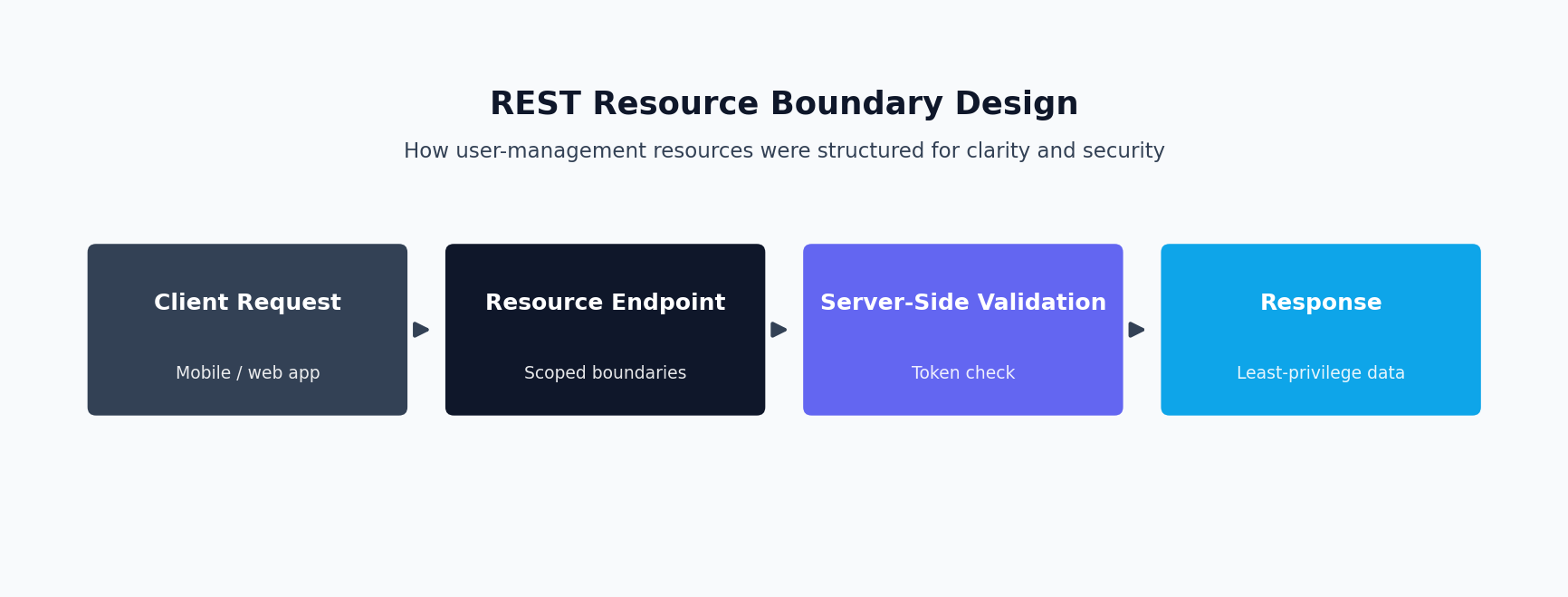
A RESTful API organized around clear resource boundaries treats each meaningful entity, a user profile, a set of credentials, a booking record, as its own resource with its own predictable set of operations. Creating, reading, updating, and removing each one is generally mapped to standard HTTP methods and consistent URL patterns.
The alternative, an API that grows organically without this discipline, tends to accumulate special-purpose endpoints that each do a slightly different combination of things. That makes the system harder for any new consumer, whether that’s a frontend team or another internal service, to learn and use correctly. Keeping resource boundaries clean also makes an API easier to secure, since authorization rules can be expressed in terms of “who can do what to this resource.” It avoids needing bespoke logic for every custom endpoint. This pattern is central to this Specsavers case study.
For a platform like Specsavers, where the user management API sits underneath booking, prescriptions, and account management, this consistency compounds. Every additional feature that needs to touch user data gets to reuse the same well-understood patterns for reading and writing that data. That’s much better than each team reinventing slightly different conventions for how their part of the system talks to user records.
Why Token Validation Has to Happen Server-Side
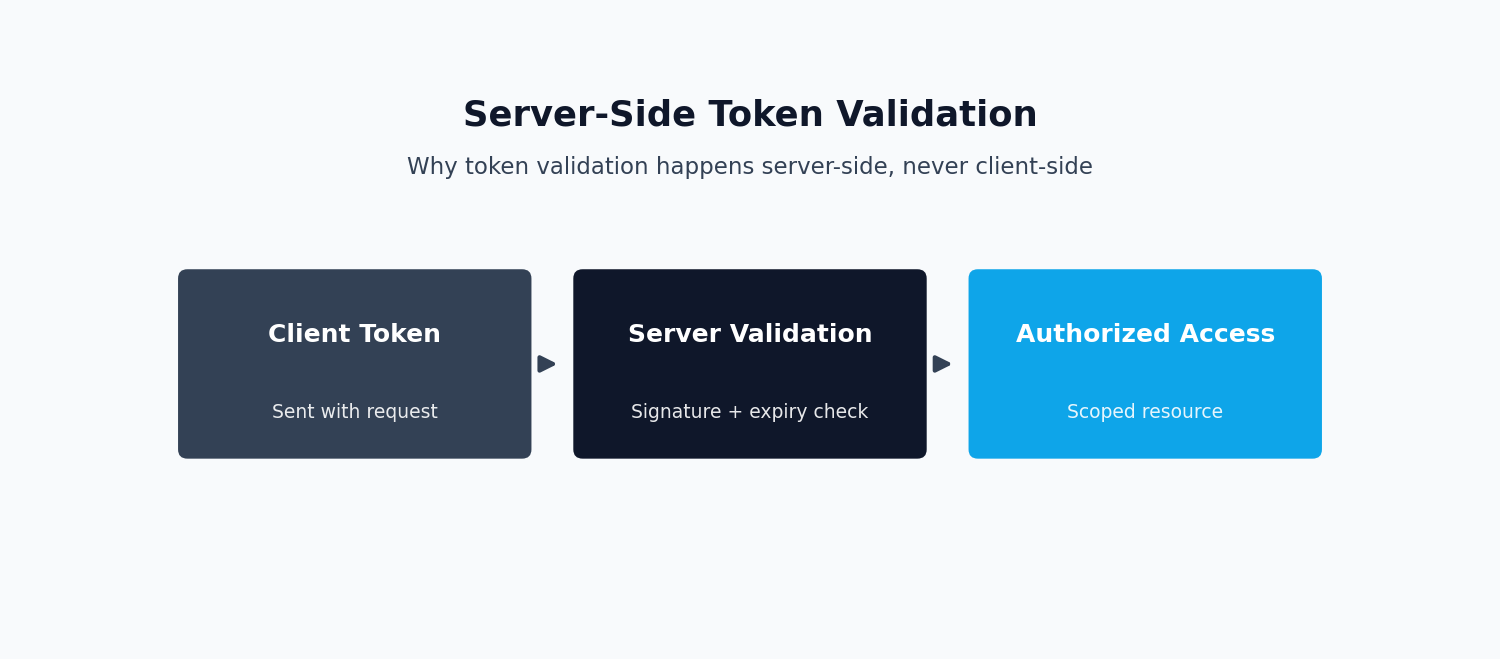
A common and dangerous shortcut in authentication integrations is to let the frontend make access decisions on its own, for instance, hiding a button or a route based on a role read out of a token. Treating that as sufficient protection is a mistake — it isn’t. Anything enforced only in the browser can be bypassed by a user who calls the underlying API directly rather than going through the app’s UI.
The frontend’s role checks are a legitimate part of good user experience, showing people only the options relevant to them, but they are not a security boundary.
The actual security boundary has to live on the server, where every request, regardless of how it was made, gets its token validated and its claims checked before any protected action is allowed to proceed. Building the Specsavers integration this way meant the API itself was safe to call directly, not just safe when accessed through the intended frontend.
Reliability as a Design Goal, Not a Bug-Fixing Exercise
Improving the reliability of an existing API is a different kind of work than building a new feature. It requires reading and understanding a system as it already behaves, including its edge cases and undocumented assumptions, before deciding what to change.
In this engagement, that meant tightening input validation so malformed requests failed predictably and with useful error information rather than causing unexpected downstream behavior. It also meant making sure that operations touching multiple related user records, such as updating a profile alongside its associated preferences, behaved consistently even when requests happened concurrently. This kind of hardening work rarely shows up as a headline feature, but it is what determines whether a platform’s other teams can build new functionality on top of the user management layer with confidence. The alternative is that they have to work around known instability. That hardening work is a major thread in this Specsavers case study.
Logging and Observability Without Exposing Sensitive Data
Improving reliability around authentication and user data also means being able to see what’s actually happening in production. That requires logging that is detailed enough to diagnose an issue after the fact without becoming a liability itself.
For endpoints handling personal and health-adjacent information, this is a genuine balancing act: a log line needs to capture enough context, which endpoint failed, for which type of request, at what time — to let an engineer reconstruct what happened. It has to do that without logging the sensitive field values themselves.
In practice this usually means logging identifiers and error categories rather than raw personal data. It also means being deliberate about what request and response fields are safe to include in a log, versus what needs to be redacted before it ever reaches a log aggregator. Getting this right matters twice over: it protects user data even in an internal system meant only for engineers. It also keeps the logs actually useful for debugging, rather than an undifferentiated wall of noise or, worse, a compliance risk in their own right. This balance is one of the more subtle lessons from this Specsavers case study.
Key Outcomes of the Specsavers Case Study
As this Specsavers case study shows, this engagement gave Specsavers a more reliable RESTful user management API that other parts of the platform could depend on. It also delivered a properly server-enforced authentication and authorization layer connecting its React frontend to its ASP.NET Core backend through Azure Active Directory. Together, these reduced both the functional bug surface around user data and the security risk of relying on client-side access checks alone.
Tech Stack
- ASP.NET Core — the backend framework used for the RESTful user management APIs. See our Hire an ASP.NET Core Developer page for related engagements.
- React — the frontend integrated with the ASP.NET Core backend and Azure AD authentication flow.
- Azure AD — used for identity and token-based authentication.
This work was completed as part of Faisal’s role as a Senior Fullstack Developer at Techscale, an agency serving clients including Specsavers — the same engagement covered throughout this Specsavers case study. For related backend API and reliability work, see the Minplan case study.
Frequently Asked Questions
Why can’t authentication be enforced only in the frontend?
Anything checked purely in the browser, such as hiding a button based on a user’s role, can be bypassed by calling the underlying API directly instead of going through the app’s interface. The frontend’s checks are good for user experience, but the real security boundary has to live on the server, where every request has its token validated checked. There, every request has its token validated and its permissions checked before any protected action proceeds, regardless of how the request was made. This is a pattern this Specsavers case study returns to repeatedly.
What does claims-based authorization mean in practice?
Instead of the API deciding what a user can do based on a separate lookup, claims-based authorization reads permissions directly from the validated token issued by the identity provider. In this Specsavers case study, that identity provider is Azure Active Directory. The token carries claims, such as a user’s roles or specific permissions, and the API checks those claims against what a given endpoint requires before allowing the request to proceed.
What does “improving reliability” mean for an existing API, concretely?
It typically means tightening input validation so bad requests fail predictably rather than causing unexpected behavior, and handling edge cases explicitly instead of letting them surface as unhandled exceptions. It also means making sure operations that touch related records behave consistently even under concurrent access. It’s less about adding new features and more about making an API’s existing behavior dependable enough for other teams to build on with confidence. That’s the throughline of this Specsavers case study.
Why organize an API around resource boundaries instead of task-specific endpoints?
Task-specific endpoints, one route per specific action, tend to multiply quickly and end up inconsistent with each other in subtle ways. Organizing around clear resources, like a user profile or a booking, with a small, predictable set of operations on each, keeps the API easier to learn and easier to secure consistently. It also makes it easier for new features elsewhere in the platform to build on, without inventing new conventions each time. This is one of the patterns this Specsavers case study highlights.
How do you log around authentication and user data without exposing sensitive information?
The general approach is to log identifiers, error categories, and enough context to reconstruct what happened, which endpoint, what kind of failure, when, while deliberately excluding sensitive field values from the log output itself. This keeps logs useful for diagnosing production issues without turning the logging system into a second, less-protected copy of sensitive user data. This Specsavers case study treats that balance as a first-class concern.
What’s the practical difference between authentication and authorization?
Authentication answers “who is this user?” and is handled here by Azure Active Directory issuing a validated token. Authorization answers “what is this user allowed to do?” and is handled by the API checking the claims inside that token against what a given action requires. Both matter, and conflating them, for example assuming that being logged in automatically means being allowed to do anything, is a common source of access-control bugs in systems that don’t separate the two clearly.
