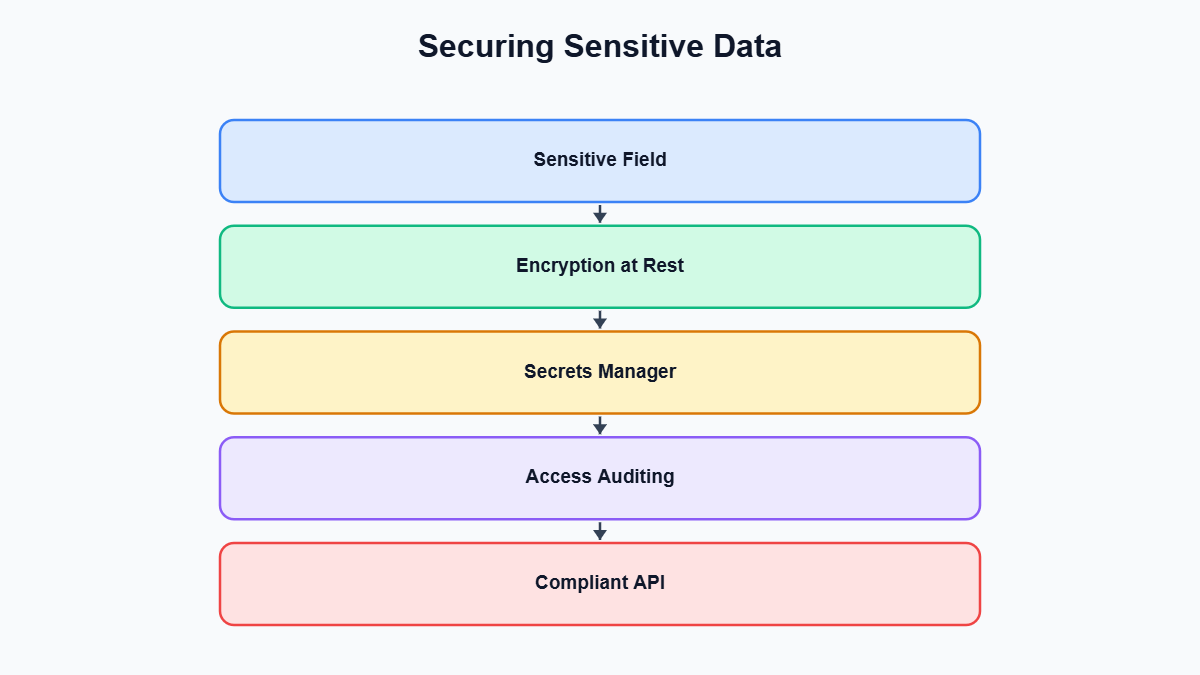
Securing sensitive data in ASP.NET Core APIs is not an optional afterthought you bolt on before a compliance audit. It’s a design constraint that should shape how you handle every request from day one. Enterprise APIs routinely move personally identifiable information (PII), authentication credentials, financial account details, and health-adjacent records through controllers, services, and databases. Every one of those hops is a place where a careless decision can turn into a data breach.
A single overlooked log statement, a misconfigured serializer, or a connection string committed to source control can undo months of otherwise solid engineering. This guide walks through the practical, code-level techniques that experienced ASP.NET Core teams use to reduce that exposure. That includes the built-in Data Protection API, proper secrets management, log hygiene, field-level encryption, response shaping, and a checklist you can run against an existing codebase today.
Key Takeaways
- ASP.NET Core’s built-in Data Protection API handles encryption at rest for sensitive fields without you hand-rolling crypto code.
- Secrets like connection strings and API keys belong in a proper secrets manager or User Secrets during development, never hardcoded or committed to source control.
- Structured logging libraries can accidentally serialize entire objects, so sensitive fields need explicit redaction before they ever reach a log sink.
- Field-level encryption and transparent data encryption solve different problems — know which threat model you’re actually defending against before picking one.
- Treat this as a checklist to run against an existing codebase, not a one-time setup: access auditing and response shaping need periodic review as the API evolves.
Encrypting Data with the ASP.NET Core Data Protection API
ASP.NET Core ships with a Data Protection stack that is purpose-built for encrypting small pieces of sensitive data that your application needs to read back later — things like tokens embedded in URLs, cookie payloads, temporary secrets passed between services, or fields you want encrypted at rest without standing up a full cryptography pipeline yourself. It is not a general-purpose encryption library for large binary payloads, but for the common case of protecting a string field or a short-lived token, it removes almost all of the ways developers get symmetric cryptography wrong: key rotation, key storage, algorithm selection, and IV management are handled for you.
The core abstraction is IDataProtector, obtained from an IDataProtectionProvider with a purpose string that scopes the key derivation to a specific use case. Two protectors created with different purposes cannot decrypt each other’s payloads, which is a useful isolation boundary between, say, password reset tokens and stored bank account fragments.
using Microsoft.AspNetCore.DataProtection;

namespace Contoso.Api.Services
{
    public class SensitiveFieldProtector
    {
        private readonly IDataProtector _protector;

        public SensitiveFieldProtector(IDataProtectionProvider provider)
        {
            // The purpose string scopes this protector so it cannot
            // decrypt payloads created for a different purpose.
            _protector = provider.CreateProtector("Contoso.Api.CustomerSsn.v1");
        }

        public string Protect(string plaintext)
        {
            return _protector.Protect(plaintext);
        }

        public string Unprotect(string cipherText)
        {
            try
            {
                return _protector.Unprotect(cipherText);
            }
            catch (System.Security.Cryptography.CryptographicException)
            {
                // Key was rotated out or payload was tampered with.
                throw new InvalidOperationException("Unable to decrypt field.");
            }
        }
    }
}
Registering the provider is a one-line addition in your startup configuration, but in a real deployment you should also configure a persistent key ring, because the default behavior stores keys on local disk, which does not survive across instances in a load-balanced or containerized environment.
builder.Services.AddDataProtection()
    .SetApplicationName("contoso-api")
    .PersistKeysToAzureBlobStorage(blobUri, credential)
    .ProtectKeysWithAzureKeyVault(keyVaultKeyUri, credential);

builder.Services.AddSingleton<SensitiveFieldProtector>();
Without persisting keys externally, every time you scale out or redeploy, a new key ring is generated per instance, and any data protected on one node becomes unreadable on another. For multi-instance deployments, back the key ring with Azure Blob Storage or another shared store, and wrap the keys themselves with a Key Vault key so that even the persisted key ring is encrypted at rest. Full details on key management options are covered in Microsoft’s ASP.NET Core Data Protection documentation, which is worth reading before you assume the defaults are production-ready.
A common mistake is reaching for Data Protection to encrypt large documents or files. It is optimized for short payloads and is not the right tool for encrypting multi-megabyte blobs — for that, use standard AES-GCM via System.Security.Cryptography with keys sourced from Key Vault, or rely on storage-layer encryption where the payload lives.
Managing Secrets Correctly: Key Vault and User Secrets
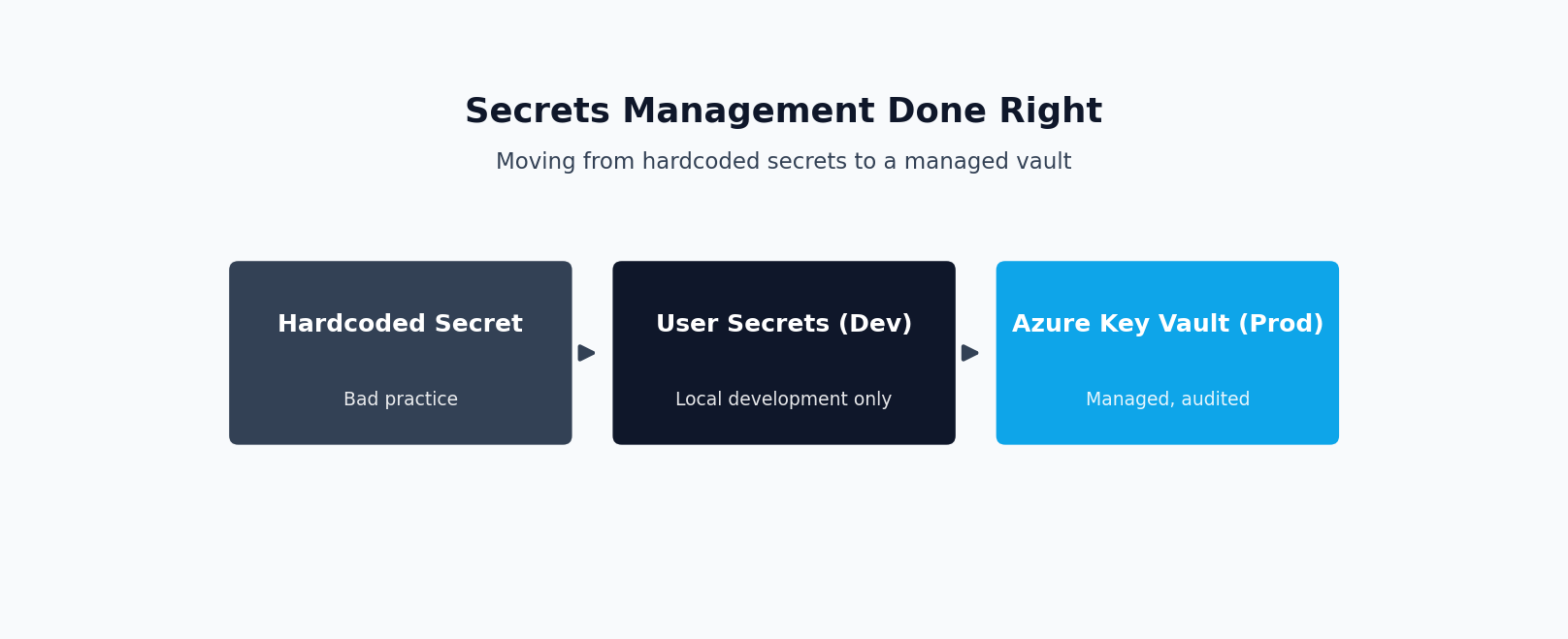
The single most common way sensitive data leaks out of an ASP.NET Core project has nothing to do with cryptography — it is a connection string, API key, or signing secret sitting in appsettings.json and committed to a Git repository. Once a secret lands in source control history, rotating it is the only real remediation; deleting the file in a later commit does not remove it from history, and anyone with clone access can retrieve it. This applies equally to private repositories, since access lists change over time and CI systems, contractors, and forked repos all expand the blast radius.
In local development, the fix is the Secret Manager tool, which stores values outside the project directory in a per-user, per-project JSON file that is never checked in.
dotnet user-secrets init
dotnet user-secrets set "ConnectionStrings:Primary" "Server=...;Password=...;"
dotnet user-secrets set "Payments:ApiKey" "sk_test_..."
These values are automatically picked up by the configuration system when the environment is Development, so no code changes are needed beyond the initial AddUserSecrets wiring that the default templates already include. In staging and production, the equivalent is Azure Key Vault, integrated directly into the configuration pipeline so that secrets are fetched at startup and refreshed on an interval, rather than baked into environment variables that end up visible in deployment logs or container inspection commands.
using Azure.Identity;

var builder = WebApplication.CreateBuilder(args);

var keyVaultUri = new Uri(builder.Configuration["KeyVault:Uri"]!);

builder.Configuration.AddAzureKeyVault(
    keyVaultUri,
    new DefaultAzureCredential());

var app = builder.Build();
With this in place, a secret named Payments--ApiKey in Key Vault maps automatically to the configuration path Payments:ApiKey, and code that reads configuration values does not need to know or care whether the value came from Key Vault, an environment variable, or a local settings file. Using DefaultAzureCredential means the same code authenticates via managed identity in Azure and via your logged-in developer credentials locally, with no secrets required to reach the secret store itself — which closes the obvious bootstrapping problem of “how do you securely store the credential that unlocks your other credentials.” Microsoft documents this integration path in detail in its guide to using Key Vault as a configuration provider.
Teams that are migrating an older codebase off hardcoded secrets, or that want a second set of eyes on how credentials flow through an existing service, often find it faster to bring in outside help for the initial audit and cleanup rather than doing a slow, incremental fix while shipping features in parallel — this is a good moment to hire an ASP.NET Core developer who has done this migration before and knows where the remaining hardcoded values tend to hide, such as integration test fixtures, Docker Compose files, and CI pipeline YAML.
Regardless of which secret store you use, never accept secrets as query string parameters or URL path segments — they end up in web server access logs, browser history, and proxy logs, none of which are typically treated as sensitive data stores even though they now contain live credentials.
Keeping Sensitive Data Out of Logs
Structured logging libraries make it dangerously easy to log an entire object graph with a single call, and that convenience is exactly what causes credentials and PII to end up in log aggregation systems that were never designed to be treated as a secrets vault. A pattern that looks completely reasonable during development is often the culprit:
public async Task<IActionResult> Register(RegisterRequest request)
{
    _logger.LogInformation("Processing registration request: {@Request}", request);
    // ...
}
If RegisterRequest contains a Password, Ssn, or ApiToken property, the destructuring operator @ in Serilog (or the equivalent behavior in other structured loggers) will happily serialize the entire object, including those fields, straight into your log sink. Once that data is in Application Insights, Splunk, or an ELK stack, it is subject to whatever retention and access policy applies to logs generally, which is almost never as strict as the policy that governs the primary database. Log data also tends to be replicated to more places — alerting pipelines, third-party monitoring tools, developer laptops during debugging — than the production database ever is, which makes this class of leak especially wide-reaching.
The fix is to be deliberate about what gets logged, either by logging specific non-sensitive fields explicitly instead of the whole object, or by implementing destructuring policies that redact known-sensitive properties automatically.
public class RegisterRequest
{
    public string Email { get; set; } = string.Empty;

    [JsonIgnore]
    public string Password { get; set; } = string.Empty;

    public string Ssn { get; set; } = string.Empty;
}

// Serilog destructuring policy applied at logger configuration time
public class SensitiveDataPolicy : IDestructuringPolicy
{
    private static readonly HashSet<string> RedactedTypes = new()
    {
        nameof(RegisterRequest)
    };

    public bool TryDestructure(
        object value,
        ILogEventPropertyValueFactory factory,
        out LogEventPropertyValue result)
    {
        if (value is RegisterRequest request)
        {
            var props = new[]
            {
                new LogEventProperty("Email", factory.CreatePropertyValue(request.Email)),
                new LogEventProperty("Password", factory.CreatePropertyValue("***REDACTED***")),
                new LogEventProperty("Ssn", factory.CreatePropertyValue("***REDACTED***"))
            };
            result = new StructureValue(props);
            return true;
        }

        result = null!;
        return false;
    }
}
A useful team-wide convention is to maintain a marker interface or attribute, such as [Sensitive], applied to any DTO property that must never be logged, and to write a single reusable destructuring policy that scans for that attribute reflectively rather than hardcoding a type list that will inevitably fall out of date. It is also worth auditing exception handling middleware, since unhandled exception logs frequently include the full request body or a serialized state object in the interest of “debuggability,” which quietly reintroduces the same leak through a different door. The same discipline applies to distributed tracing — spans and trace attributes attached via Activity.SetTag are just as visible to downstream systems as log lines are, and should follow the same redaction rules.
Field-Level Encryption vs. Transparent Data Encryption
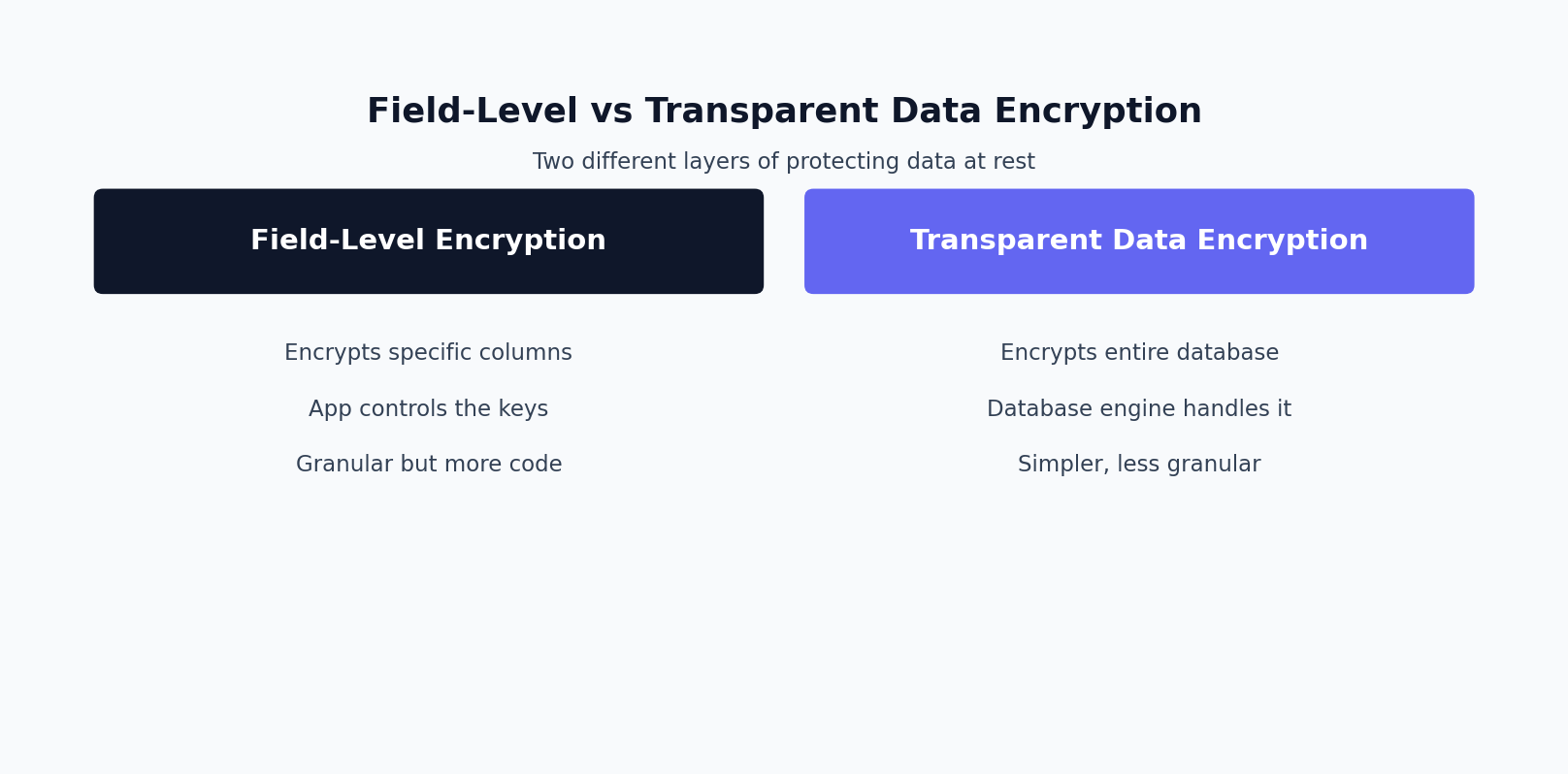
Full-disk or transparent data encryption (TDE) at the database engine level protects data files, backups, and transaction logs from being read if someone gains access to the underlying storage medium — a stolen backup tape, a misconfigured storage account, or a compromised disk snapshot. It is a strong baseline control, it has no application code impact, and it should be the default for any production database holding sensitive information. What TDE does not do is protect data from anyone with a legitimate database connection: a DBA running an ad hoc query, an application with a compromised connection string, or a SQL injection vulnerability all see plaintext once the data is decrypted for reading, because TDE decrypts transparently as part of normal query execution.
Field-level encryption addresses that gap by encrypting specific columns before they ever reach the database, so that even a full SELECT * against the table returns ciphertext for that column unless the caller also holds the decryption key. This is the right tool for a small number of genuinely high-sensitivity fields — Social Security numbers, bank account numbers, or health record identifiers — where you want to constrain decryption to a specific, audited code path rather than to “anyone with database access.”
public class Customer
{
    public int Id { get; set; }
    public string Name { get; set; } = string.Empty;
    public string Email { get; set; } = string.Empty;

    // Stored ciphertext; decrypted on demand via the protector, never
    // materialized in plaintext by EF Core's change tracker.
    public string SsnEncrypted { get; set; } = string.Empty;
}

public class CustomerService
{
    private readonly SensitiveFieldProtector _protector;
    private readonly AppDbContext _db;

    public CustomerService(SensitiveFieldProtector protector, AppDbContext db)
    {
        _protector = protector;
        _db = db;
    }

    public async Task SetSsnAsync(int customerId, string plaintextSsn)
    {
        var customer = await _db.Customers.FindAsync(customerId);
        customer!.SsnEncrypted = _protector.Protect(plaintextSsn);
        await _db.SaveChangesAsync();
    }
}
The tradeoff is real: field-level encryption breaks native SQL querying, filtering, and indexing on the encrypted column, complicates reporting pipelines, and adds key management responsibility to the application layer rather than the database engine. Applying it indiscriminately across every column in a schema creates operational pain without a proportional security benefit. A sensible approach is to classify columns explicitly — public, internal, PII, and restricted — and reserve field-level encryption for the restricted tier, letting TDE and network-layer transport encryption (TLS everywhere, including internal service-to-service calls) cover everything else. This tiered approach also makes future audits easier, because the encrypted-column list becomes a concrete, reviewable inventory of exactly what the organization considers highest-risk data, rather than a vague policy statement nobody can verify against the actual schema.
Designing Secure API Responses with DTOs
Returning Entity Framework Core entities directly from a controller action is one of the most persistent sources of accidental data exposure in ASP.NET Core APIs, because it couples your public HTTP contract to your internal data model. Every new column added to an entity for an internal purpose — an audit flag, a soft-delete marker, a legacy password hash left over from a migration — becomes visible to API consumers the moment the default JSON serializer touches it, unless someone remembers to annotate it with [JsonIgnore] after the fact. That is a fragile control: it depends on every future developer remembering a step that has nothing to do with the feature they are building.
// Fragile: exposes whatever the entity happens to contain today,
// including columns nobody intended to expose.
[HttpGet("{id}")]
public async Task<ActionResult<User>> GetUser(int id)
{
    var user = await _db.Users.FindAsync(id);
    return user is null ? NotFound() : Ok(user);
}

// Explicit: the response shape is a deliberate, versioned contract.
public record UserResponse(int Id, string Name, string Email, DateTime CreatedAt);

[HttpGet("{id}")]
public async Task<ActionResult<UserResponse>> GetUser(int id)
{
    var user = await _db.Users.FindAsync(id);
    if (user is null) return NotFound();

    return Ok(new UserResponse(user.Id, user.Name, user.Email, user.CreatedAt));
}
The same risk runs in the opposite direction on write operations, commonly called over-posting or mass assignment. If an action binds the request body directly to an EF Core entity and calls SaveChanges, a client can include fields in the JSON payload that were never intended to be client-settable — an IsAdmin flag, an AccountBalance, or a Role field — and the model binder will happily populate them if the property names match. Using dedicated request DTOs for input, mapped explicitly onto the entity rather than bound directly to it, closes this off by construction: a property that does not exist on the request DTO simply cannot be set by the caller, regardless of what the request body contains.
Tools like AutoMapper or manual mapping methods both work fine for this; the important property is that the mapping is explicit and reviewable, not that it uses any particular library. For APIs with multiple consumers — a mobile app, a partner integration, and an internal admin tool — different DTOs per consumer are often worth the extra classes, since a field that is safe to expose to your own admin UI is not necessarily safe to expose to a third-party partner, and collapsing both into one shared response type tends to erode that distinction over time as new fields get added under deadline pressure.
A Practical Checklist for Reviewing an Existing API
Most ASP.NET Core APIs in production were not designed with this level of scrutiny from day one, so periodic review is more realistic than getting everything right up front. The following checklist is a reasonable starting point for a focused audit:
- Search the entire repository history, not just the current branch, for connection strings, API keys, and tokens committed in plaintext, and rotate anything found regardless of how old the commit is.
- Confirm
appsettings.jsonand its environment-specific variants contain no live secrets, and that Development environments use the Secret Manager tool rather than a shared team file. - Verify production secrets are sourced from Key Vault or an equivalent managed secret store, accessed via managed identity rather than a stored credential.
- Grep logging call sites for object destructuring (
{@Object}or equivalent) applied to request or response DTOs, and confirm sensitive fields are excluded or redacted. - Review exception handling middleware and any “log the full request on error” logic for the same leakage pattern.
- List every controller action that returns an EF Core entity type directly, and replace those responses with explicit DTOs.
- List every controller action that binds request bodies directly to entity types, and replace with request DTOs mapped explicitly to entities.
- Classify database columns by sensitivity tier and confirm the highest tier uses field-level encryption in addition to TDE.
- Confirm TLS is enforced for all external traffic and, where feasible, for internal service-to-service calls as well.
- Check that Data Protection keys are persisted to a shared, protected store rather than local disk in any environment with more than one instance.
- Review CORS configuration to ensure sensitive endpoints are not inadvertently reachable from origins that should not have access.
- Confirm error responses returned to clients do not include stack traces, internal exception messages, or database error text in production.
None of these items require exotic tooling — most can be done with repository search, a code review pass, and a short session with the team that owns the database schema. The value comes from doing the review deliberately and on a schedule, rather than treating sensitive data handling as something that only gets attention after an incident. Treat this checklist as a living document specific to your API’s actual data model, and revisit it whenever a new integration, a new entity, or a new external consumer is added, since each of those is a natural point where a new exposure gets introduced without anyone intending it.
Frequently Asked Questions
What’s the difference between the Data Protection API and field-level encryption?
The ASP.NET Core Data Protection API handles framework-level concerns like encrypting cookies, tokens, and other transient data with automatic key management. Field-level encryption is something you apply explicitly to specific database columns (like an SSN or account number) so the data stays encrypted at rest even if someone gets direct database access, which Data Protection alone doesn’t cover.
Should secrets like connection strings live in appsettings.json?
No, not in source control. Use User Secrets for local development and a managed service like Azure Key Vault for production, so credentials never end up committed to a repository. A connection string committed to source control is one of the most common ways sensitive data ends up exposed.
How do sensitive fields end up leaking into application logs?
Usually through default serialization: logging an entire request or entity object for debugging purposes captures every property, including passwords, tokens, or PII, without anyone deciding to log them deliberately. Explicit log scrubbing or attribute-based redaction is necessary because “don’t log sensitive data” isn’t enforceable by default.
Why use DTOs instead of returning entity models directly from an API?
Returning entity models directly means every field on that model is exposed to the client by default, including ones added later by another developer who doesn’t realize the model is public-facing. DTOs force an explicit, reviewed decision about exactly which fields leave the API boundary.
Is field-level encryption necessary if the whole database is already encrypted at rest?
Transparent Data Encryption protects against someone stealing the physical disk or backup file, but not against a compromised application account or an overly broad SQL query. Field-level encryption adds a second layer so that even a leaked database credential doesn’t expose the most sensitive columns in plain text.
What’s a quick way to audit an existing API for sensitive data exposure?
Walk through every response DTO and log statement asking “would I be comfortable if this exact payload appeared in a support ticket or log aggregator.” That single-question checklist catches most of the accidental exposure that formal security reviews miss.
