Short answer: You do not have to rewrite a Vue codebase to move to the Composition API: it is the recommended style for new Vue 3 code, and Options API components keep working, so migrate gradually where it pays off.
Vue 3 Composition API vs Options API: A Migration Guide
\n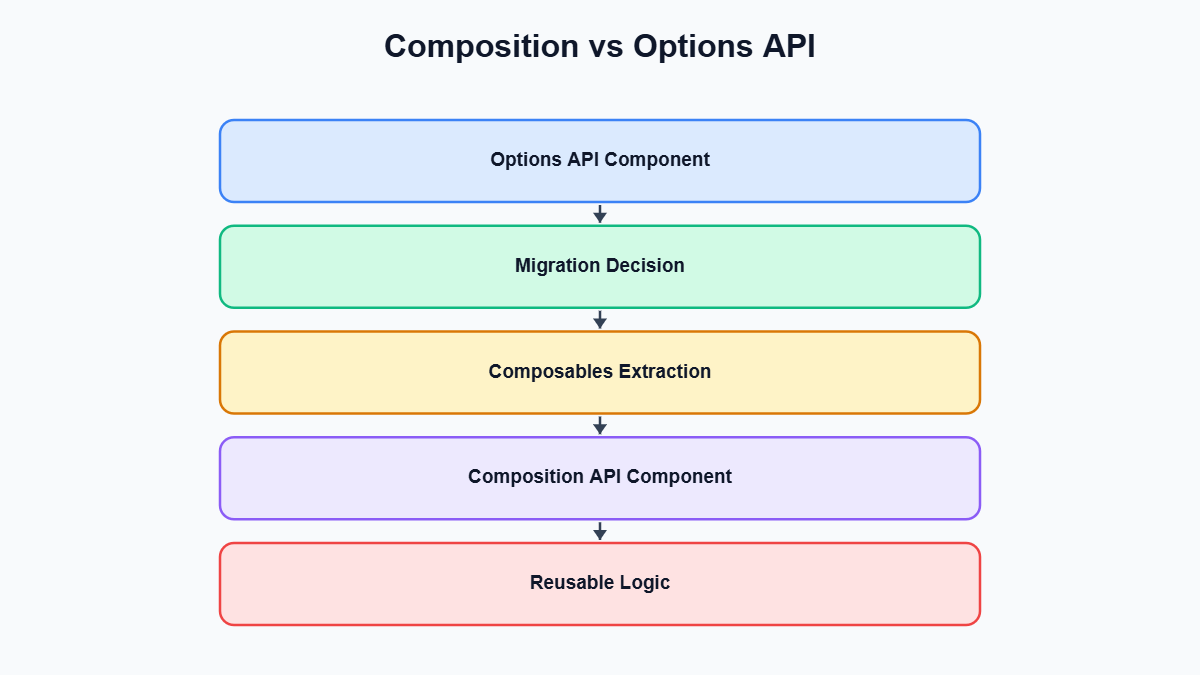 \nIf you maintain a Vue 2 codebase, or a Vue 3 app that was written before
 <script setup> became the default recommendation, you’ve probably had the “should we migrate to the Vue 3 Composition API” conversation at least once. It usually starts with a senior developer getting frustrated trying to extract shared logic out of three near-identical components, and it usually ends with someone opening a ticket titled “Migrate to Composition API” that nobody quite knows how to scope. This guide is meant to close that gap — not with another syntax comparison table, but with an actual decision framework and a migration path you can run against a real, working codebase without freezing feature development for a quarter.
We’ll cover what actually changes conceptually between the two APIs, when it’s genuinely fine to leave Options API components alone, when the Composition API earns its complexity, how to migrate incrementally, and the pitfalls that trip up teams somewhere around week three of a migration — usually right after the initial enthusiasm wears off.
The core conceptual shift: organizing by option vs organizing by concern
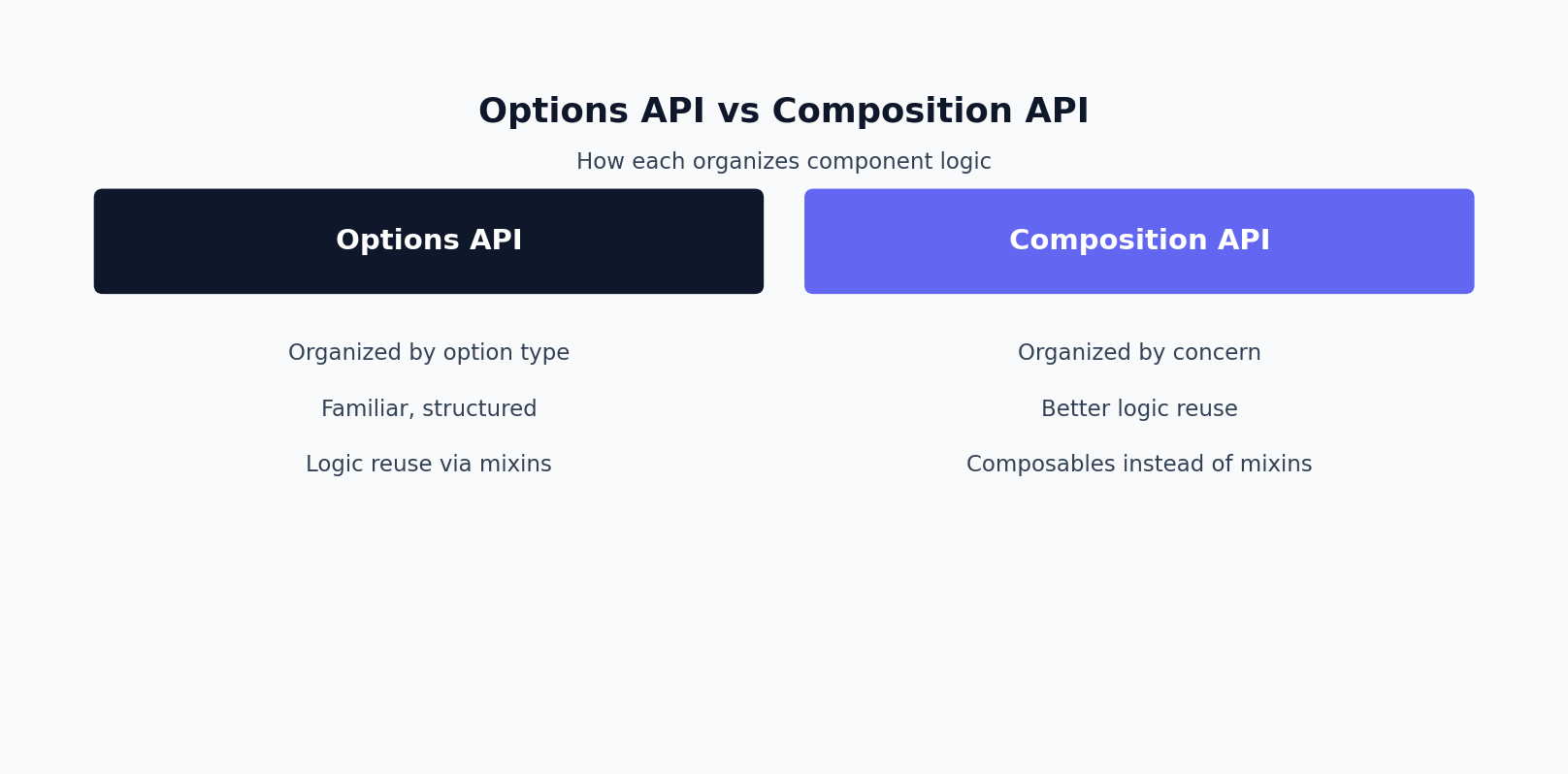
The Options API organizes a component by type of option: all your reactive state lives in data(), all your derived values live in computed, all your methods live in methods, all your side-effect watchers live in watch. This is friendly to newcomers because it reads like a form — you know exactly where to look for any given kind of thing. The tradeoff is that a component with three loosely related features (say, form validation, pagination, and a websocket subscription) ends up with each feature’s code scattered across five different option blocks.
The Composition API flips that: you organize by feature. All the state, computed values, methods, and watchers for one concern can live next to each other in a single function, and that function can be lifted out of the component entirely into a reusable composable. That’s the whole pitch in one sentence, but the mechanics matter, so let’s look at the same component written both ways.
<!-- Options API -->
<template>
  <div>
    <input v-model="query" placeholder="Search users..." />
    <p>{{ resultCount }} results</p>
    <ul>
      <li v-for="user in filteredUsers" :key="user.id">{{ user.name }}</li>
    </ul>
  </div>
</template>

<script>
export default {
  name: 'UserSearch',
  props: {
    users: { type: Array, required: true }
  },
  data() {
    return {
      query: ''
    };
  },
  computed: {
    filteredUsers() {
      return this.users.filter(u =>
        u.name.toLowerCase().includes(this.query.toLowerCase())
      );
    },
    resultCount() {
      return this.filteredUsers.length;
    }
  },
  watch: {
    query(newVal) {
      this.$emit('query-changed', newVal);
    }
  },
  mounted() {
    this.$emit('mounted');
  }
};
</script>
<!-- Composition API (options-style setup(), no <script setup> yet) -->
<template>
  <div>
    <input v-model="query" placeholder="Search users..." />
    <p>{{ resultCount }} results</p>
    <ul>
      <li v-for="user in filteredUsers" :key="user.id">{{ user.name }}</li>
    </ul>
  </div>
</template>

<script>
import { ref, computed, watch, onMounted } from 'vue';

export default {
  name: 'UserSearch',
  props: {
    users: { type: Array, required: true }
  },
  emits: ['query-changed', 'mounted'],
  setup(props, { emit }) {
    const query = ref('');

    const filteredUsers = computed(() =>
      props.users.filter(u =>
        u.name.toLowerCase().includes(query.value.toLowerCase())
      )
    );

    const resultCount = computed(() => filteredUsers.value.length);

    watch(query, (newVal) => {
      emit('query-changed', newVal);
    });

    onMounted(() => {
      emit('mounted');
    });

    return { query, filteredUsers, resultCount };
  }
};
</script>
Notice the three mechanical differences that matter most when you’re reading Composition API code for the first time. First, this.data becomes a ref that you read and write through .value in JavaScript (but not in the template — Vue unwraps it automatically there). Second, methods just become plain functions declared inside setup(); there’s no implicit this binding, which is actually a feature once you’re used to it, because arrow functions and closures behave exactly the way they do everywhere else in JavaScript. Third, computed and watch are imported functions rather than object keys, and a watcher now watches a specific ref or getter instead of a property name, which means typos get caught by your editor instead of failing silently at runtime.
When the Options API is still the right call
It’s worth saying plainly: the Options API is not deprecated, it’s not “legacy,” and Vue core team members still reach for it. If your team is mostly backend engineers who touch the frontend occasionally, or you’re building marketing pages, admin CRUD screens, or components with fewer than roughly 100-150 lines of script logic, Options API components are usually easier for a broader range of contributors to read at a glance. The structure enforces a convention, and conventions lower the cognitive load of onboarding someone new.
Options API also tends to age fine in components that don’t need to share logic with anything else — a one-off modal, a static footer, a settings page with a handful of independent fields. Rewriting those for the sake of “modernizing” is often pure churn: you introduce risk (every migrated component is a chance to reintroduce a bug) without a corresponding gain in maintainability, because there was nothing to reuse in the first place.
A good rule of thumb: if you can’t name a second place in the app that needs the same logic, and the component isn’t fighting TypeScript, leave it as Options API.
For the canonical reference, see the official Vue.js Composition API FAQ and the Vue.js composables guide — both are maintained by the core team and cover nuances beyond this migration guide.
When the Composition API genuinely wins
The case for the Vue 3 Composition API stops being theoretical in three specific situations.
Logic reuse. Options API gives you mixins, and mixins have two well-documented problems: unclear property origin (you can’t tell at a glance whether this.loading came from the component or a mixin) and silent naming collisions between mixins. Composables solve both — everything a composable returns is explicit, named, and traceable to its import.
TypeScript inference. The Options API’s this typing relies on Vue inferring types across a big merged object, which works but degrades quickly once props, computed properties, and injected values start interacting. Composition API functions are just typed JavaScript functions; TypeScript infers argument and return types the same way it would for any other function, and IDE autocomplete inside setup() is noticeably more reliable, especially for injected values from provide/inject.
Large, JS-heavy components. Once a component has several independent pieces of state each with their own watchers and derived values, Options API’s “group by option type” layout works against you — related code for one feature is spread across data, computed, watch, and methods, so understanding “what does the pagination logic actually do” means jumping around the file. Composition API lets you keep that logic contiguous.
Here’s what that reuse looks like in practice — a composable that handles fetching and pagination, extracted once and reused across a users list, a products list, and an orders list:
// composables/usePagination.js
import { ref, computed, watch } from 'vue';

export function usePagination(fetchFn, { pageSize = 20 } = {}) {
  const items = ref([]);
  const page = ref(1);
  const total = ref(0);
  const loading = ref(false);
  const error = ref(null);

  const totalPages = computed(() =>
    Math.max(1, Math.ceil(total.value / pageSize))
  );

  async function load() {
    loading.value = true;
    error.value = null;
    try {
      const { data, count } = await fetchFn({
        offset: (page.value - 1) * pageSize,
        limit: pageSize
      });
      items.value = data;
      total.value = count;
    } catch (err) {
      error.value = err;
    } finally {
      loading.value = false;
    }
  }

  function nextPage() {
    if (page.value < totalPages.value) page.value += 1;
  }

  function prevPage() {
    if (page.value > 1) page.value -= 1;
  }

  watch(page, load, { immediate: true });

  return { items, page, total, totalPages, loading, error, nextPage, prevPage, reload: load };
}
<!-- components/UsersList.vue -->
<script setup>
import { usePagination } from '@/composables/usePagination';
import { fetchUsers } from '@/api/users';

const { items: users, page, totalPages, loading, nextPage, prevPage } =
  usePagination(fetchUsers, { pageSize: 25 });
</script>

<template>
  <div>
    <p v-if="loading">Loading...</p>
    <ul v-else>
      <li v-for="user in users" :key="user.id">{{ user.name }}</li>
    </ul>
    <button :disabled="page === 1" @click="prevPage">Prev</button>
    <span>{{ page }} / {{ totalPages }}</span>
    <button :disabled="page === totalPages" @click="nextPage">Next</button>
  </div>
</template>
That’s the entire value proposition in one example: the pagination state machine is written once, fully typed if you’re using TypeScript, unit-testable in isolation without mounting a component, and every list screen in the app just calls one function to get it. Doing the equivalent with mixins is possible but painful — you’d fight naming collisions the moment two mixins both want a property called loading.
Before mapping out the migration, it helps to restate the core Vue 3 Composition API tradeoff: Vue 3 Composition API organizes code by concern, while the Options API organizes by option type.
A practical incremental migration strategy
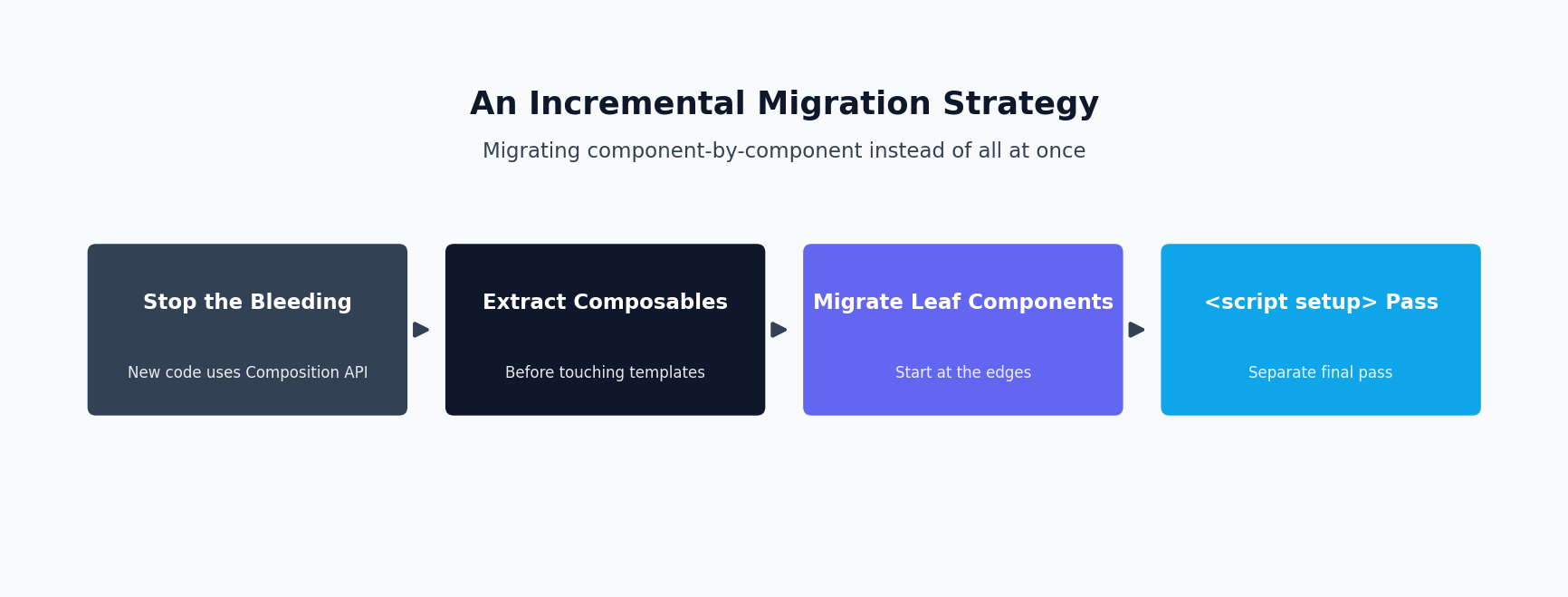
The single biggest mistake teams make when adopting the Vue 3 Composition API is treating it as a rewrite project. Big-bang rewrites of working UI code have a poor track record generally, and Vue specifically doesn’t require one — Options API and Composition API components coexist in the same app, the same route, even the same parent-child tree, indefinitely. Vue 3 was explicitly designed so both APIs can be used side by side, so there’s no compatibility cliff forcing your hand.
A migration plan that actually survives contact with a sprint calendar looks like this:
1. Stop the bleeding first
Set a team convention: new components are written in Composition API (ideally with <script setup>) starting now. Existing components stay as-is until touched. This alone prevents the Options API footprint from growing while you plan the rest.
2. Extract shared logic into composables before touching component templates
Find the two or three mixins, or the two or three copy-pasted chunks of logic, causing the most pain right now — usually things like data fetching, form validation, or permission checks. Rewrite just that logic as a composable and have it live alongside the existing Options API components via setup() (you don’t need <script setup> to use a composable — a component can stay 90% Options API and still call a composable inside a small setup() block that returns its result). This gets you the biggest maintainability win — logic reuse — with the smallest blast radius, since template markup doesn’t change at all.
3. Migrate component-by-component, starting at the leaves
Convert leaf components (ones with no children that are also mid-migration) before container components. Prioritize by: components that are actively being modified for feature work anyway (migrate while you’re in there), components with the most duplicated logic (highest payoff), and components under active test coverage (lowest risk, since you’ll know immediately if behavior changed). Deprioritize stable, rarely-touched components — a settings page that hasn’t changed in a year and has zero bugs filed against it is not a good use of migration time.
4. Convert to <script setup> as a separate pass, not simultaneously
Moving from Options API to a setup()-based Composition API component is one behavioral change. Simultaneously switching to <script setup> syntax is a second, purely syntactic change. Doing both in one commit makes code review harder and makes it difficult to tell whether a bug came from the logic change or the syntax change. Land the logic migration, verify it in QA, then do a follow-up syntax-only pass to <script setup> if desired.
5. Set a realistic finish line — or none at all
Many production Vue apps run a permanent mix of both APIs, and that’s a legitimate end state, not a failure. If a component works, has no bugs, and nobody needs to extract logic from it, converting it is optional busywork. Reserve migration effort for components where it pays for itself.
Most Vue 3 Composition API migration pitfalls only surface once a component grows past its first refactor — a rushed Vue 3 Composition API conversion often hides reactivity bugs that only appear under real usage.
Pitfalls that show up mid-migration (not on day one)
The first few components you migrate usually go smoothly, which is exactly why teams get burned by the next batch — the easy components go first, and the pitfalls below tend to surface once you hit anything non-trivial.
Losing the this context you were relying on implicitly
In Options API, this gives you access to props, data, computed, methods, and injected values all through one object, and Vue wires that up for you automatically. In Composition API’s setup(), there is no this — it’s undefined by design, because setup() runs before the component instance is fully created. If you’re migrating a component that leans on this.$refs, this.$parent, or a mixin method called implicitly, you need to explicitly import the equivalent (useTemplateRef or a plain ref for template refs, explicit props/emit for parent communication) rather than assuming it’ll be reachable the way it used to be.
Destructuring a reactive object silently breaks reactivity
This is the pitfall that costs teams the most debugging time, because the code runs without errors — it just stops updating. reactive() returns a Proxy, and Vue’s reactivity tracking depends on property access going through that Proxy. The moment you destructure a primitive value out of it, you get a plain, disconnected value that no longer triggers updates.
import { reactive, toRefs } from 'vue';

// Pitfall: destructuring breaks the reactive connection
const state = reactive({ count: 0, name: 'Ada' });

// count is now just a plain number frozen at 0 — it will NOT
// update in the template or anywhere else when state.count changes.
const { count, name } = state;

function increment() {
  state.count++; // updates state.count, but the local `count` variable
                  // above is completely disconnected from it
}
import { reactive, toRefs } from 'vue';

// Fix: toRefs() converts each property into a ref that stays
// linked to the original reactive object
const state = reactive({ count: 0, name: 'Ada' });
const { count, name } = toRefs(state);

function increment() {
  state.count++; // count.value now correctly reflects the update
}

// count is a ref, so read/write it with .value in script,
// and it unwraps automatically in the template
This exact pattern bites teams most often when writing composables that return an object built with reactive() — if the composable does the destructuring internally before returning, or if a consuming component destructures the composable’s return value directly, reactivity quietly disappears. The convention that avoids this entirely: prefer ref() over reactive() for values that might ever be destructured or passed around individually, and reserve reactive() for objects you’ll always access as a whole via dot notation.
Lifecycle hook names changed, and a couple of hooks vanished
The mapping is mostly mechanical but easy to get wrong from memory: created and beforeCreate have no Composition API equivalent because code at the top level of setup() already runs at that point in the lifecycle — you just write that code directly instead of wrapping it in a hook. mounted becomes onMounted, updated becomes onUpdated, unmounted becomes onUnmounted, and beforeDestroy/destroyed (the Vue 2 names) map to onBeforeUnmount/onUnmounted respectively — a common Vue 2-to-3 migration bug is copying the old hook name literally and getting a silent no-op because Vue 3 doesn’t warn on an unrecognized import, it just fails to compile if you import something that doesn’t exist, which is usually caught — but teams sometimes work around that by leaving stale logic in a hook that no longer fires at the time they expect.
This is where the Vue 3 Composition API ergonomics story gets stronger — pairing Vue 3 Composition API with script setup removes most of the remaining ceremony compared to the Options API.
How <script setup> removes the remaining boilerplate
Everything above uses the “explicit” Composition API — a setup() function that returns an object of everything the template needs. That return statement is pure boilerplate: you write query once to declare it and again to expose it. <script setup> removes that entirely — every top-level binding in a <script setup> block is automatically available in the template, props and emits get compact macro syntax, and the compiler does extra optimization since it knows the full set of bindings at compile time.
<script setup>
import { ref, computed, watch } from 'vue';

const props = defineProps({
  users: { type: Array, required: true }
});

const emit = defineEmits(['query-changed']);

const query = ref('');

const filteredUsers = computed(() =>
  props.users.filter(u =>
    u.name.toLowerCase().includes(query.value.toLowerCase())
  )
);

const resultCount = computed(() => filteredUsers.value.length);

watch(query, (newVal) => emit('query-changed', newVal));
</script>

<template>
  <div>
    <input v-model="query" placeholder="Search users..." />
    <p>{{ resultCount }} results</p>
    <ul>
      <li v-for="user in filteredUsers" :key="user.id">{{ user.name }}</li>
    </ul>
  </div>
</template>
Compare that to the earlier setup() version of the same component — no manual return statement, no props option object separate from where it’s used, no emits array disconnected from the emit calls that use it. For teams migrating from Options API, this matters practically: <script setup> components read closer to plain, linear JavaScript than the ceremony of a setup() return object, which shortens the learning curve for developers coming from Options API’s implicit-binding mental model. It’s worth treating the move to <script setup> as the natural end point of a migration, even if you land the underlying logic change first.
Teams that plan a Vue 3 Composition API migration around real usage, rather than a calendar deadline, ship it with far fewer regressions. A Vue 3 Composition API migration done component-by-component, alongside normal feature work, tends to finish faster in practice than one planned as a dedicated multi-sprint Vue 3 Composition API rewrite.
\n
To summarize: the Vue 3 Composition API migration pays off most for components with shared, reusable logic — revisit this Vue 3 Composition API guide whenever a new component starts duplicating logic across your codebase.
Making the call
The decision isn’t “Composition API is strictly better” or “Options API is legacy” — it’s a question of where each component sits on two axes: how much logic does it share with other components, and how large and JavaScript-heavy is it. Simple, self-contained components stay perfectly maintainable in Options API indefinitely. Components with real shared logic, non-trivial TypeScript, or enough internal complexity that “group by feature” beats “group by option type” are where the Vue 3 Composition API pays for the extra concept count. Most production codebases we look at end up as a deliberate mix of both, migrated component-by-component as those components are touched for other reasons — not as a standalone rewrite sprint.
If you’re weighing this decision for a real production codebase and want a second opinion on scope, risk, and sequencing before committing engineering time to it, our team offers Vue.js development services and can help you plan a migration that fits around your existing release schedule rather than around a rewrite.
Need this built or reviewed in production? Hire a senior full-stack developer or explore my AI integration services.
