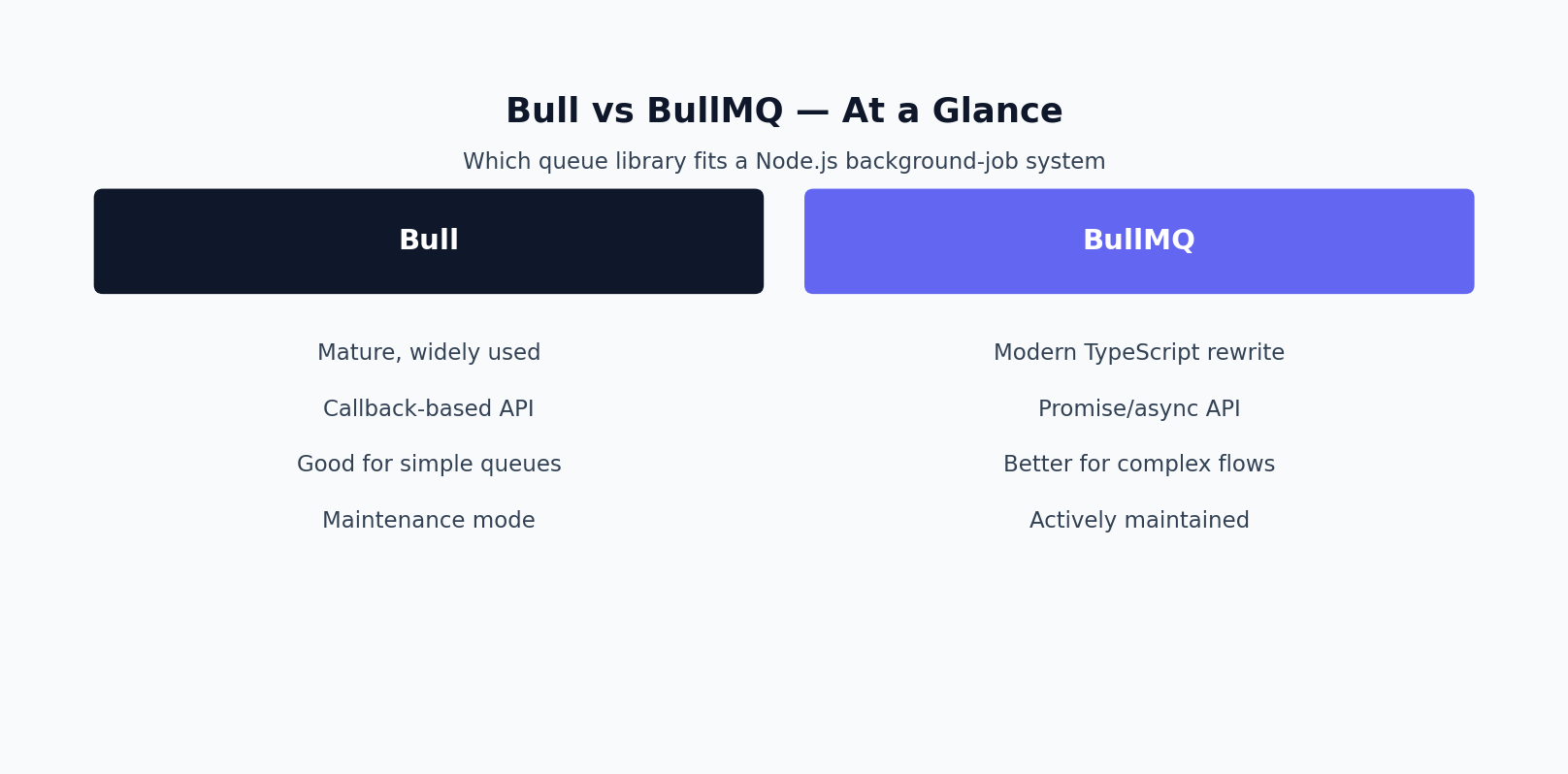
Short answer: For new Node.js projects, use BullMQ: it is the actively developed successor to Bull, which is in maintenance mode. Stay on Bull only if you have an existing, stable setup that does not justify a migration.
Introduction: Why Your Background Job Library Choice Matters
Every Node.js application that sends emails, processes images, generates PDFs, syncs data with third-party APIs, or runs any kind of deferred work eventually needs a job queue. Handling that work inline, inside an HTTP request handler, is a recipe for timeouts, dropped jobs, and unhappy users. That’s where a Redis-backed queueing library comes in, and in the Node.js ecosystem two names dominate the conversation: Bull queue and BullMQ. Choosing between the two is one of the most common architecture decisions Node.js teams face. Both are mature and production-proven, but they are not interchangeable, and picking the wrong one for your situation can cost real engineering time down the road.
This post is a practical comparison of how the two libraries are built, where they diverge, and how to decide which one fits a new project versus a codebase already running on the older tool, with real TypeScript code samples along the way.
What Bull and BullMQ Actually Are
Bull is a Node.js library for creating robust, Redis-backed job and message queues. It was one of the first libraries to bring a genuinely production-grade queueing abstraction to Node.js, with job prioritization, delayed jobs, retries, and rate limiting built on Redis’s atomic operations and Lua scripting. For years, if a project needed a queue, the Bull queue package was simply the default answer.
BullMQ is the spiritual and technical successor, written from the ground up by largely the same core maintainer to address architectural limitations that had accumulated in the original codebase. It was designed with TypeScript as a first-class citizen, a fully async/await API, and a modular architecture that separates queues, workers, queue events, and job schedulers into distinct, composable classes. Despite being a near-total rewrite, BullMQ keeps the mental model that made Bull queue popular: jobs are added to a queue, workers process them, and Redis coordinates the state.
The Shared Redis Foundation
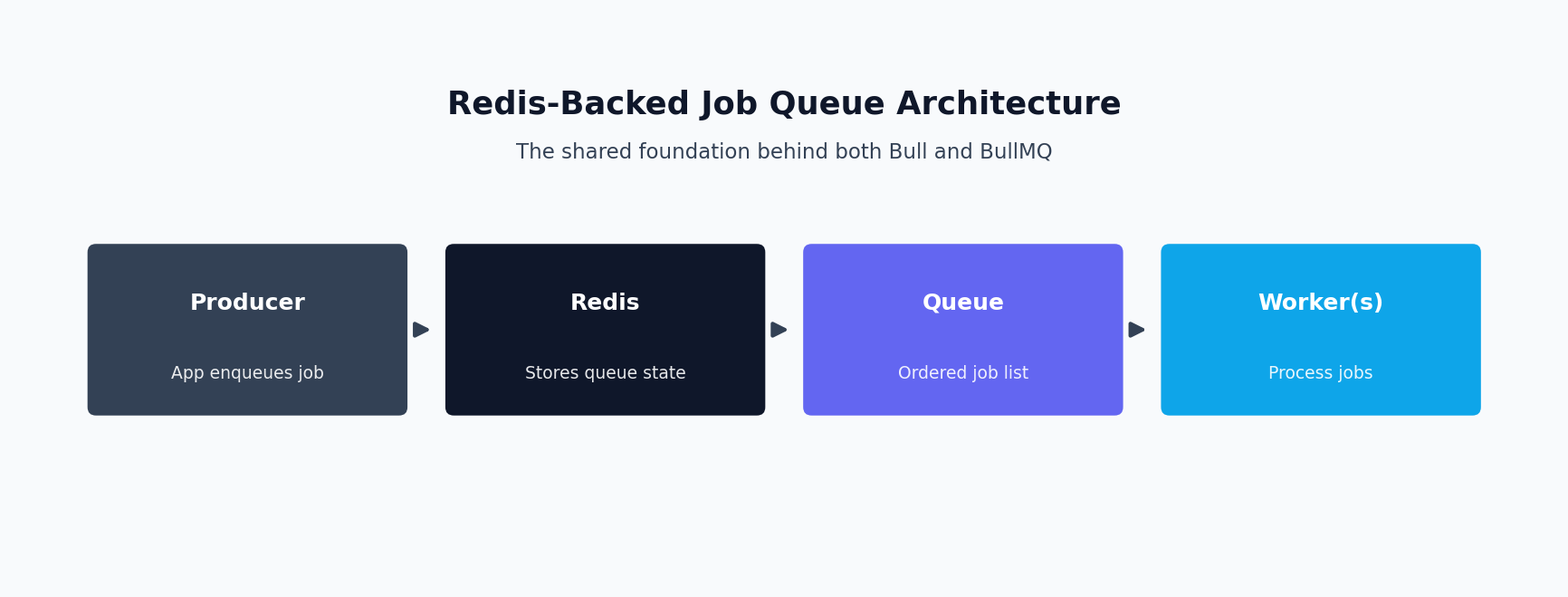
Both libraries use Redis as their single source of truth. Neither invents its own persistence layer; jobs are stored as Redis hashes, queue ordering is maintained with sorted sets and lists, and job state transitions are implemented with atomic Lua scripts to avoid race conditions when multiple workers pull from the same queue concurrently.
- Both require a Redis instance — there’s no SQLite or in-memory fallback for production use.
- Job data must be JSON-serializable, since it’s stored as a Redis hash field.
- Because Redis handles atomicity, either library can safely run many worker processes against the same queue without duplicate job processing.
- Neither is a message broker in the RabbitMQ or Kafka sense — there’s no durable log replay or cross-datacenter replication built in.
Because the underlying data model is so similar, teams migrating from Bull queue to BullMQ don’t need to redesign their Redis topology.
Architectural Differences: Callbacks vs Async/Await, and TypeScript Support
The most immediately visible difference is API style. Bull’s processor functions were written in an era when Node.js callback conventions and early Promise support coexisted. BullMQ, by contrast, was built async/await-first. Every asynchronous operation returns a Promise, worker processors are plain async functions, and the library leans on Node’s EventEmitter in a consistent, predictable way.
TypeScript support is the other major fork. Bull has community-maintained type definitions that cover common cases reasonably well, but you’ll periodically hit loose any types. BullMQ is written in TypeScript natively — job payloads, return values, and every options object are strongly typed.
// Bull queue - callback-style
const Queue = require('bull');
const emailQueue = new Queue('emails', { redis: { host: '127.0.0.1', port: 6379 } });

await emailQueue.add({ to: 'user@example.com', template: 'welcome' });

emailQueue.process(5, async (job) => {
  await sendEmail(job.data.to, job.data.template);
});
The BullMQ equivalent separates the queue (for adding jobs) from the worker (for processing them) into two distinct, typed classes:
import { Queue } from 'bullmq';

interface EmailJobData {
  to: string;
  template: 'welcome' | 'password-reset' | 'invoice';
}

const emailQueue = new Queue<EmailJobData>('emails', {
  connection: { host: '127.0.0.1', port: 6379 },
});

await emailQueue.add('send-email', {
  to: 'user@example.com',
  template: 'welcome',
});
This split into separate Queue, Worker, and QueueEvents classes is not just cosmetic — a producer service that only enqueues jobs doesn’t need to import worker logic, and it makes dependency boundaries much cleaner than Bull’s more monolithic single-object design.
Job Flows and Parent-Child Dependencies
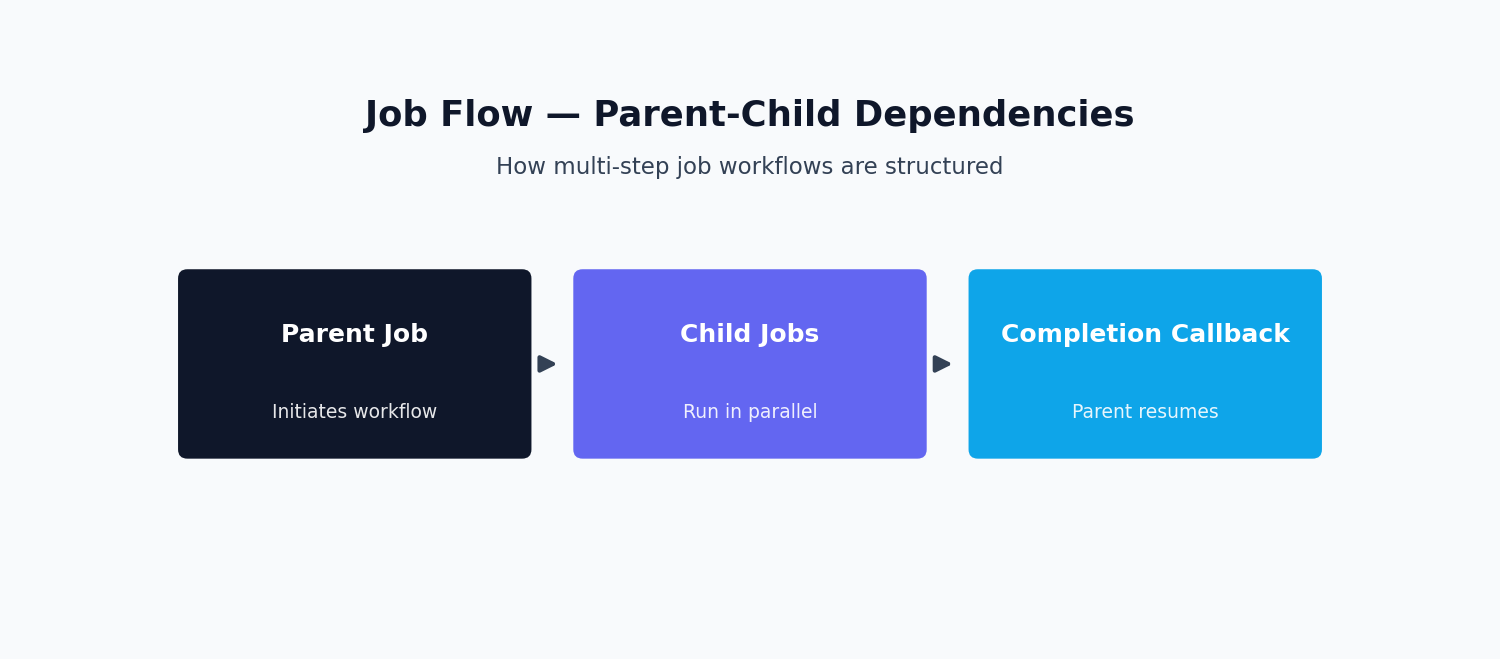
One of the most requested features that never made it into Bull queue is job flows — a parent job that depends on the completion of one or more child jobs, only becoming eligible for processing once every child has finished successfully. With Bull, developers had to hand-roll this coordination. BullMQ solves it natively with a FlowProducer class, which lets you declare a tree of parent and child jobs in a single call, even spanning different queues.
import { FlowProducer } from 'bullmq';

const flowProducer = new FlowProducer({
  connection: { host: '127.0.0.1', port: 6379 },
});

const retryOpts = { attempts: 3, backoff: { type: 'exponential', delay: 2000 } };

const flow = await flowProducer.add({
  name: 'finalize-order',
  queueName: 'orders',
  data: { orderId: 'ord_12345' },
  children: [
    { name: 'charge-payment', queueName: 'payments', data: { orderId: 'ord_12345', amount: 4999 }, opts: retryOpts },
    { name: 'reserve-inventory', queueName: 'inventory', data: { orderId: 'ord_12345', sku: 'SKU-9981' }, opts: retryOpts },
    { name: 'notify-warehouse', queueName: 'notifications', data: { orderId: 'ord_12345' } },
  ],
});
If your product involves any kind of multi-step workflow orchestration, this single capability is often reason enough to choose BullMQ over Bull queue for a new build.
Rate Limiting: Global vs Per-Queue and Per-Group
Both libraries support rate limiting, but the granularity differs. Bull’s classic rate limiter is applied at the queue level: a maximum number of jobs processed within a duration window, applying globally. BullMQ extends this with group-based rate limiting — you can rate-limit by a group key inside the job data, for example throttling API calls per tenant, all within the same queue.
import { Queue, Worker } from 'bullmq';

const connection = { host: '127.0.0.1', port: 6379 };
const apiQueue = new Queue('third-party-api-calls', { connection });

const worker = new Worker(
  'third-party-api-calls',
  async (job) => callExternalApi(job.data.endpoint, job.data.payload),
  { connection, limiter: { max: 50, duration: 1000 } }
);

await apiQueue.add(
  'sync-tenant-data',
  { tenantId: 'tenant_882', endpoint: '/v1/records' },
  { group: { id: 'tenant_882' } }
);
If your workload has natural sub-populations that each need their own throttle, BullMQ’s grouped rate limiting removes a whole category of workaround code, like maintaining a separate queue per tenant, that teams on Bull queue often resort to.
Job Scheduling and Repeatable Jobs
Delayed jobs and repeatable jobs are supported by both libraries with very similar APIs. The meaningful difference is under the hood: BullMQ introduced a dedicated Job Scheduler abstraction that is more resilient to clock drift and avoids duplicate job creation when multiple producer instances start at the same time. Repeatable jobs on Bull queue work fine for straightforward cron-style needs but are more prone to subtle duplication issues in distributed deployments.
Concurrency and Worker Scaling
Both libraries process multiple jobs concurrently within a process and scale horizontally by running additional worker processes against the same Redis instance. In Bull, concurrency is a parameter passed to .process(); in BullMQ, it’s a first-class option on a dedicated Worker constructor.
import { Worker, Job } from 'bullmq';

interface ImageJobData {
  imageUrl: string;
  transformations: string[];
}

const worker = new Worker<ImageJobData>(
  'image-processing',
  async (job: Job<ImageJobData>) => {
    const { imageUrl, transformations } = job.data;
    const result = await processImage(imageUrl, transformations);
    await job.updateProgress(100);
    return { processedUrl: result.url };
  },
  { connection: { host: '127.0.0.1', port: 6379 }, concurrency: 10, limiter: { max: 20, duration: 1000 } }
);

worker.on('failed', (job, err) => {
  console.error('Job ' + job?.id + ' failed:', err.message);
});
Because Redis coordinates job locking in both libraries, a given job is only ever picked up by one worker at a time, making it safe to run worker fleets in Kubernetes or any autoscaling environment.
Error Handling and Retry Strategies with Exponential Backoff
Reliable retry behavior is arguably the entire point of using a job queue. Both Bull queue and BullMQ support configurable retry attempts and backoff strategies, but BullMQ is more flexible, supporting custom backoff strategy functions in addition to the built-in fixed and exponential types.
import { Worker } from 'bullmq';

const worker = new Worker(
  'webhook-delivery',
  async (job) => {
    const response = await fetch(job.data.webhookUrl, {
      method: 'POST',
      body: JSON.stringify(job.data.payload),
      headers: { 'Content-Type': 'application/json' },
    });
    if (!response.ok) {
      throw new Error('Webhook responded with status ' + response.status);
    }
    return { deliveredAt: new Date().toISOString() };
  },
  { connection: { host: '127.0.0.1', port: 6379 }, concurrency: 5 }
);

await webhookQueue.add(
  'deliver-webhook',
  { webhookUrl: 'https://client.example.com/hooks/order', payload: { orderId: 'ord_12345' } },
  { attempts: 5, backoff: { type: 'exponential', delay: 1000 }, removeOnComplete: { age: 3600 }, removeOnFail: { age: 86400 } }
);
A few practices apply equally to both libraries: always throw or reject inside your processor to signal failure, always set a bounded attempts value, and always configure removeOnComplete/removeOnFail so Redis memory doesn’t grow unbounded.
Monitoring: Bull Board, Arena, and Observability
You cannot operate queues in production without visibility into what’s waiting, active, failed, and why. Bull Board is an open-source, Express/Fastify/Koa-mountable UI that supports adapters for both, showing job counts, payloads, and failure stack traces. Arena is an older dashboard originally built for Bull, supporting multiple Redis-backed queue “hosts” in one view; it still works with BullMQ but has seen less active development by comparison.
For scripted observability, BullMQ’s QueueEvents class gives an event-driven stream of job lifecycle transitions you can pipe into your logging or metrics stack. Bull exposes similar events, though with a less granular, less strictly-typed API.
Migration Considerations for Teams on Legacy Bull
If you have a production system built on Bull queue, the question isn’t whether BullMQ is “better” in the abstract — it’s whether the migration cost is justified. A few things to weigh:
- API surface changes are non-trivial. A
.process()call becomes a separateWorkerclass, and event names differ in places. - Redis data is not directly compatible. The two libraries store job data in different internal formats, so migrations typically involve draining the old queue and cutting new job creation over, rather than an in-place data migration.
- Mixed-mode operation during rollout is common and safe if deliberate. New job types go straight to BullMQ, legacy job types keep flowing through Bull until phased out, as long as each queue’s Redis key namespace stays distinct.
- Test retry and dead-letter behavior explicitly against a real Redis instance after the cutover rather than assuming feature parity.
A Recommendation Framework: New Projects vs Existing Codebases
There is very little reason to start a greenfield Node.js project on Bull queue today. BullMQ is actively maintained, has a stronger TypeScript story, supports job flows and grouped rate limiting that Bull simply doesn’t have, and its async/await-first API feels more natural in modern codebases. Default to BullMQ for anything new.
If you have a mature production system running on Bull queue, with simple job types and no need for job flows or grouped rate limiting, there’s a reasonable argument for leaving it alone — it’s still maintained for critical fixes.
The strongest migration signal isn’t “BullMQ is newer” — it’s a concrete pain point: you need reliable multi-step job orchestration and are hand-rolling parent-child coordination, you need per-tenant rate limiting and are maintaining a queue-per-tenant workaround, or you’re seeing duplicate-job bugs in repeatable jobs across multiple app instances.
For the full API reference behind the examples above, see the official BullMQ documentation. Whether you land on one or the other, understanding the underlying Redis primitives both libraries build on will help you reason about retries, concurrency, and failure modes beyond what any Bull queue vs BullMQ comparison article, including this one, can fully cover.
This decision comes down to your team’s TypeScript needs and scaling roadmap. If you’re starting fresh in 2026, the comparison almost always favors BullMQ, while teams deep in a stable Bull migration path may reasonably stay put a while longer.
Is BullMQ a Good RabbitMQ Alternative?
A different question comes up almost as often as the queue-vs-queue comparison itself: is BullMQ a viable RabbitMQ alternative, or is a bullmq vs rabbitmq comparison even meaningful? The honest answer is that they solve overlapping but distinct problems. RabbitMQ is a general-purpose message broker built for cross-service messaging patterns — fanout, topic routing, dead-letter exchanges — independent of any one language. BullMQ is a Redis-backed job queue built specifically for Node.js background processing: retries, delays, rate limiting, and job lifecycle tracking, without running a separate broker process. If your team already runs Redis, and the workload is Node.js background jobs rather than cross-service pub/sub, BullMQ is usually the simpler choice. Reaching for it as a bullmq alternative to standing up RabbitMQ typically means less operational overhead, not more.
Quick Start: Adding and Tracking a Job
Getting a minimal BullMQ setup running takes a few lines. After npm install bullmq, add jobs to a queue and read back the job id BullMQ assigns:
const { Queue, Worker } = require('bullmq');
const emailQueue = new Queue('emails', { connection });

const job = await emailQueue.add('welcome-email', { to: 'user@example.com' });
console.log(job.id);

const worker = new Worker('emails', async (job) => {
  return { sent: true };
}, { connection });

worker.on('completed', (job, result) => {
  console.log('completed job', job.id, result);
});
It’s common to console.log job status like this during local development before wiring up real monitoring. The value returned from the processor becomes the job result, available as result on the completed event. So once a completed job finishes, you can see exactly what it produced without querying Redis directly.
Getting It Right the First Time
The two are both solid, battle-tested tools, and “which one” is less important than most teams initially treat it. What actually determines whether your background job system holds up in production is careful design around retries, idempotency, rate limiting, and observability.
If you’re building a new Node.js service that needs reliable background processing, evaluating a migration between the two, or troubleshooting a queue system that’s already misbehaving in production, you can hire a Node.js developer with hands-on experience across both to design, build, or migrate your job architecture correctly from the start.
Frequently Asked Questions
Should I use Bull or BullMQ for a new Node.js project?
For a new project, default to BullMQ. It has a stronger TypeScript story, supports job flows and grouped rate limiting that Bull queue doesn’t have, and its async/await-first API fits modern codebases better. There’s very little reason to start a greenfield project on Bull queue today.
Can I migrate from Bull to BullMQ without redesigning my Redis setup?
Yes. Both libraries use the same Redis foundation, jobs as hashes, ordering via sorted sets and lists, so you don’t need to redesign your Redis topology. However, the two libraries store job data in different internal formats, so migration typically means draining the old queue and cutting new job creation over to BullMQ rather than an in-place data migration.
Does BullMQ support job dependencies that Bull queue doesn’t?
Yes. BullMQ has a native FlowProducer class for declaring parent-child job trees, even across different queues, so a parent job only becomes eligible once all its children finish successfully. Bull queue has no built-in equivalent, teams have to hand-roll this coordination themselves.
What’s the main API difference between Bull and BullMQ?
Bull uses a callback-era, largely monolithic API where a single Queue object both adds and processes jobs. BullMQ splits this into separate, strongly-typed Queue, Worker, and QueueEvents classes and is async/await-first throughout, keeping producer and consumer code cleanly separated.
Is Bull queue still maintained, or should I treat it as deprecated?
Bull is still maintained for critical fixes, and a mature production system running on it with simple job types and no need for job flows or grouped rate limiting can reasonably stay on it. It isn’t deprecated, but new feature development happens on BullMQ, not Bull.
How do I monitor Bull or BullMQ queues in production?
Bull Board is the most common choice, an open-source, Express/Fastify/Koa-mountable UI with adapters for both Bull queue and BullMQ that shows job counts, payloads, and failure stack traces. BullMQ also exposes a QueueEvents class for piping job lifecycle events into your own logging or metrics stack.
Building something similar? See my AI integration services or hire a senior full-stack developer for your project.
